Chapter 9: Few-Shot and Example-Based Prompting
Teaching AI Through Carefully Selected Examples
Learning Objectives
After completing this chapter, you will be able to:
- Explain the power of few-shot learning
- Select effective examples for few-shot prompts
- Format and present examples appropriately
- Avoid common few-shot pitfalls
- Combine few-shot with other prompting techniques
What Is Few-Shot Prompting?
Definition
Few-shot prompting provides examples of desired input-output pairs before presenting the actual task. The AI learns the pattern from examples and applies it to new inputs.
The Learning Paradigm
 Figure 9.1: The progression from zero-shot (no examples) through one-shot to few-shot prompting with multiple examples.
Why It Works
- Pattern Recognition: AI extracts patterns from examples
- Implicit Rules: Examples communicate rules hard to verbalize
- Format Matching: Output format is demonstrated, not just described
- Calibration: Examples calibrate the style and level of detail
The Power of Examples
Examples vs. Instructions
Sometimes showing is more effective than telling:
Instruction Only:
Convert the following casual text to professional business language.

Input: "hey, wanted to check if u got my email about the meeting?"
With Examples:
Convert casual text to professional business language.

Example 1:
Input: "gonna be late to the thing tmrw"
Output: "I will be arriving late to tomorrow's meeting."

Example 2:
Input: "can u send me that doc asap?"
Output: "Could you please send me that document at your earliest convenience?"

Now convert:
Input: "hey, wanted to check if u got my email about the meeting?"
Output:
The examples communicate tone, formality level, and transformation patterns more effectively than instructions alone.
Selecting Effective Examples
Example Selection Criteria
| Criterion | Description | Why It Matters |
|---|---|---|
| Representative | Covers typical cases | Ensures broad applicability |
| Diverse | Shows range of inputs | Prevents narrow pattern learning |
| Clear | Unambiguous input-output relationship | Avoids confusion |
| Relevant | Similar to actual task | Maximizes transfer |
| Correct | Demonstrates proper handling | Sets quality standard |
The Selection Process
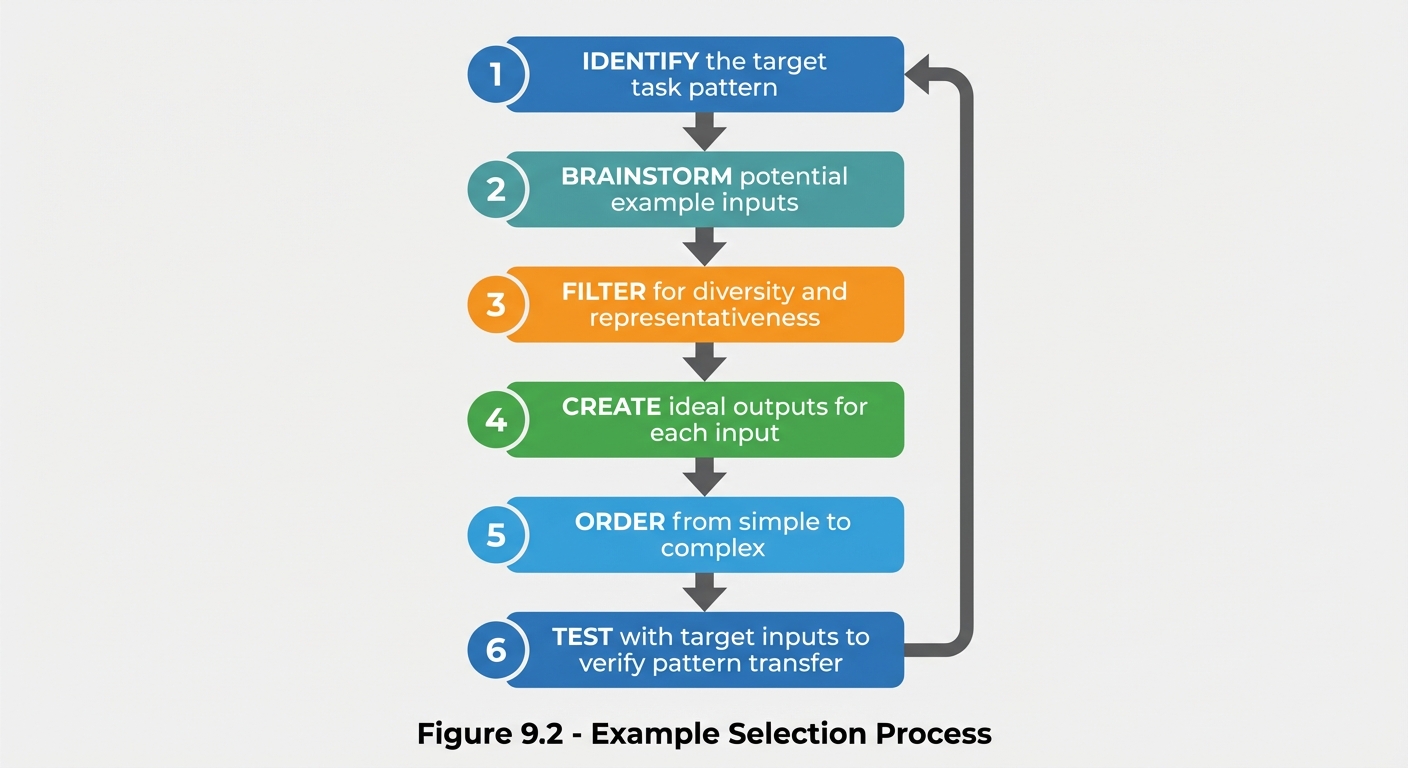 Figure 9.2: The six-step process for selecting effective few-shot examples, from identifying patterns to testing transfer.
Example Diversity Strategy
Ensure examples cover:
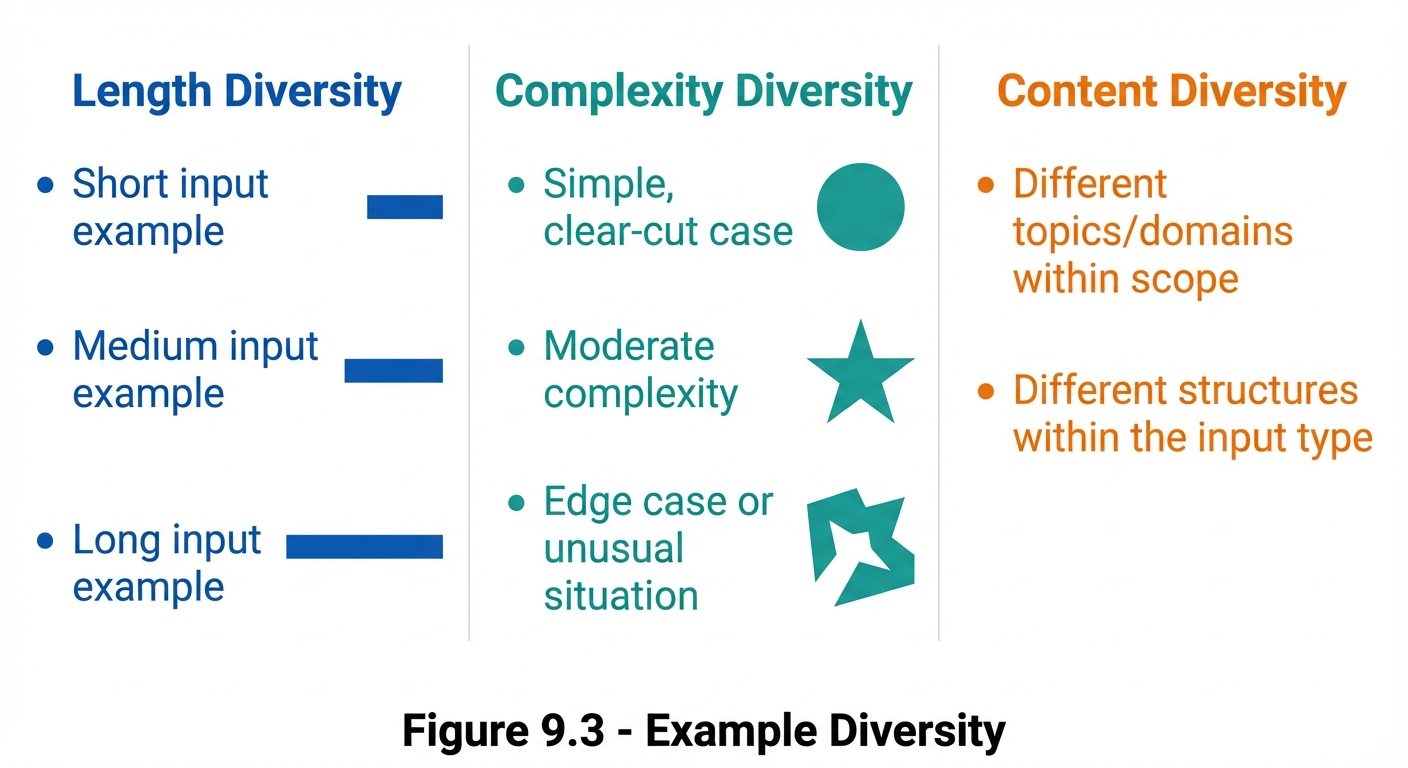 Figure 9.3: The three dimensions of example diversity to ensure comprehensive coverage in few-shot prompts.
Example Formatting
Basic Format Pattern
[Task description]

Example 1:
Input: [Example input 1]
Output: [Example output 1]

Example 2:
Input: [Example input 2]
Output: [Example output 2]

Example 3:
Input: [Example input 3]
Output: [Example output 3]

Now process:
Input: [Actual input]
Output:
Delimiter Variations
| Style | Example | Best For |
|---|---|---|
| Labeled | Input: X / Output: Y | General use |
| Arrow | X → Y | Simple transformations |
| Bracketed | [X] => [Y] | Technical contexts |
| Section | Headers with content | Complex examples |
| Code-style | func(X) = Y | Programming tasks |
Labeled Format
Text: "The movie was absolutely terrible and I hated every minute."
Sentiment: Negative

Text: "I really enjoyed the meal, though the service was slow."
Sentiment: Mixed

Text: "Best purchase I've ever made!"
Sentiment: Positive

Text: "The product arrived on time."
Sentiment:
Section Format
---
EXAMPLE 1:

Customer Complaint:
"I've been waiting 3 weeks for my order and nobody is responding
to my emails. This is unacceptable!"

Analysis:
- Primary Issue: Delayed delivery (3 weeks)
- Secondary Issue: No communication response
- Customer Emotion: Frustrated, angry
- Priority: High (multiple issues, duration)

---
EXAMPLE 2:
[...]
---

NOW ANALYZE:

Customer Complaint:
"[Actual complaint]"

Analysis:
How Many Examples?
General Guidelines
| Shots | When to Use |
|---|---|
| 1-shot | Very simple patterns, limited context |
| 2-3 shots | Standard tasks, most common |
| 4-5 shots | Complex patterns, edge cases matter |
| 5+ shots | Highly nuanced tasks, fine calibration |
Factors to Consider
More examples needed when:
• Task is complex or nuanced
• Output format is elaborate
• Edge cases are important
• Pattern is subtle

Fewer examples sufficient when:
• Task is simple and clear
• Context window is limited
• Pattern is obvious
• Speed is priority
Diminishing Returns
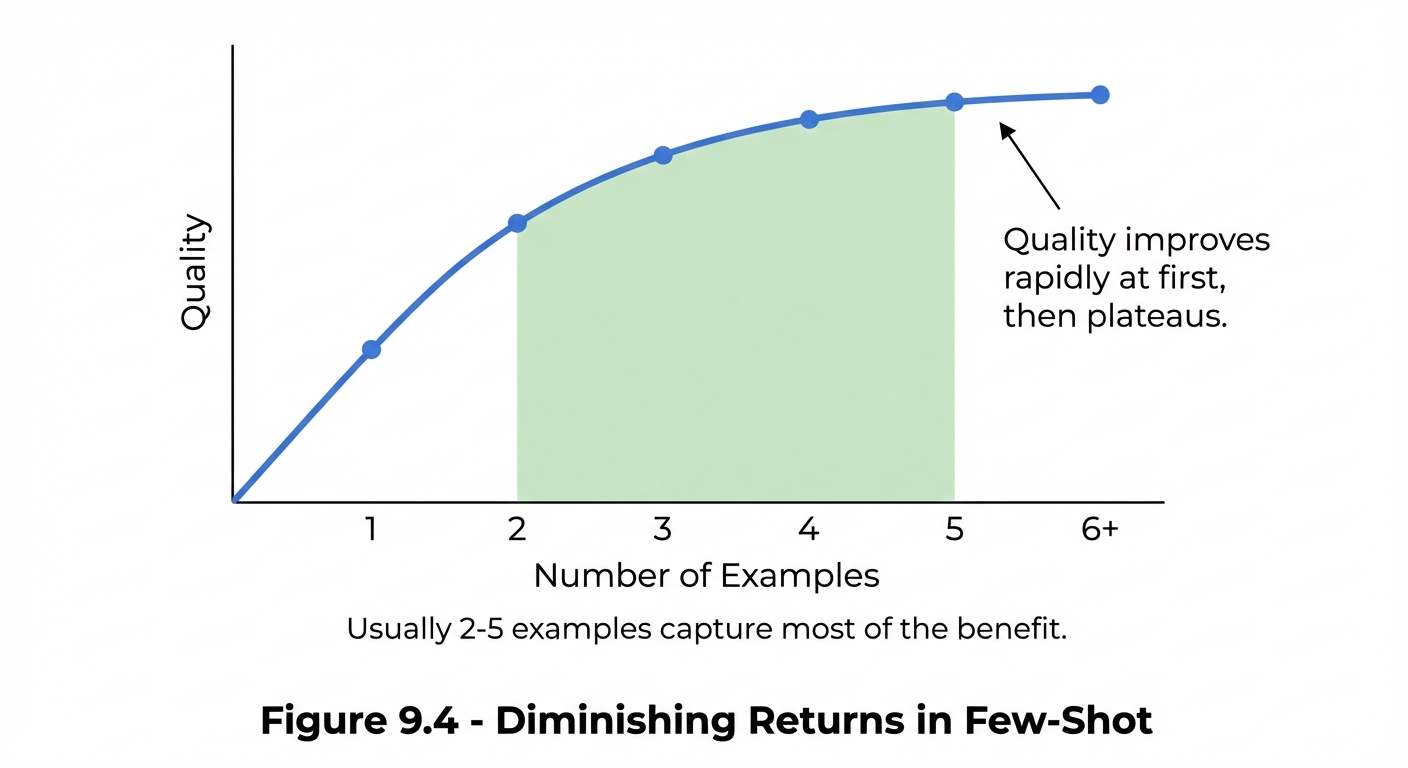 Figure 9.4: The diminishing returns curve showing optimal example count—typically 2-5 examples capture most benefits.
Example Ordering
Ordering Strategies
| Strategy | Description | When to Use |
|---|---|---|
| Simple → Complex | Easiest first | Teaching complex patterns |
| Typical → Edge | Common cases first | Emphasizing normal behavior |
| Similarity order | Most similar to task last | Maximizing relevance |
| Random | No particular order | When all are equal |
The Recency Effect
Examples placed last often have stronger influence:
# Weak positioning for important example
Example 1: [The crucial example you want followed]
Example 2: [Less relevant]
Example 3: [Less relevant]

# Strong positioning for important example
Example 1: [Simple case]
Example 2: [Building complexity]
Example 3: [The crucial example you want followed]

Actual task: [Input]
Few-Shot for Different Tasks
Classification Tasks
Classify the support ticket priority.

Ticket: "My account was hacked and someone made unauthorized purchases!"
Priority: Critical

Ticket: "The app crashes when I try to upload large files."
Priority: High

Ticket: "How do I change my notification settings?"
Priority: Low

Ticket: "I can't log in but I need to submit a report by end of day."
Priority: High

Ticket: "The new update removed my favorite feature."
Priority:
Transformation Tasks
Convert formal English to casual text for social media.

Formal: "We are pleased to announce the launch of our new product line."
Casual: "Big news! Our new products just dropped! 🎉"

Formal: "Customers are advised that our offices will be closed on Monday."
Casual: "Heads up - we're closed Monday! Back Tuesday ✌️"

Formal: "We appreciate your continued patronage and loyalty."
Casual:
Generation Tasks
Write a product description in our brand voice.

Product: Wireless Earbuds, 24hr battery, noise cancelling
Description: "Silence the world, not your music. Our wireless
earbuds deliver 24 hours of pure, uninterrupted sound with
noise cancellation that lets you focus on what matters."

Product: Laptop Stand, aluminum, adjustable height
Description: "Elevate your work, literally. This sleek aluminum
stand adjusts to your perfect height, turning any desk into
an ergonomic workstation."

Product: Reusable Water Bottle, 32oz, insulated
Description:
Extraction Tasks
Extract contact information from the text.

Text: "Reach out to Sarah Chen at schen@acme.com or call our
office at (555) 123-4567 for more information."
Extracted: {"name": "Sarah Chen", "email": "schen@acme.com",
"phone": "(555) 123-4567"}

Text: "For press inquiries, contact media@startup.io"
Extracted: {"email": "media@startup.io"}

Text: "Questions? Ask John (j.doe@company.com) or visit us
at 123 Main St, Suite 400."
Extracted:
Common Few-Shot Pitfalls
Pitfall 1: Inconsistent Examples
Problem: Examples follow different patterns
❌ INCONSISTENT:
Example 1: Input: "hello" → Output: "HELLO"
Example 2: Text: "world" / Result: "WORLD"

✅ CONSISTENT:
Example 1: Input: "hello" → Output: "HELLO"
Example 2: Input: "world" → Output: "WORLD"
Pitfall 2: Unrepresentative Examples
Problem: Examples don’t match actual use cases
❌ UNREPRESENTATIVE:
(All examples are short, simple sentences, but actual
inputs are long, complex paragraphs)

✅ REPRESENTATIVE:
(Examples include a mix of short and long inputs
similar to expected actual inputs)
Pitfall 3: Incorrect Examples
Problem: Examples contain errors that get replicated
❌ INCORRECT:
Input: "2 + 2"
Output: "5"  ← Wrong answer will be learned!

✅ CORRECT:
Input: "2 + 2"
Output: "4"
Pitfall 4: Too Few Edge Cases
Problem: Examples don’t show how to handle unusual inputs
❌ MISSING EDGE CASES:
(All examples are standard cases)

✅ INCLUDES EDGE CASES:
Example 3: Input: "" (empty)
Output: "No input provided"

Example 4: Input: "N/A"
Output: "Not applicable"
Pitfall 5: Format Leakage
Problem: AI reproduces example artifacts
❌ FORMAT LEAKAGE:
Examples all use "[Example X]" labels
Output: "[Example 5] Here is the answer..."

✅ CLEAN FORMAT:
Use separators (---) between examples
Clear transition to actual task
Combining Few-Shot with Other Techniques
Few-Shot + Chain-of-Thought
Example 1:
Question: If a train travels 60 miles in 2 hours, what is its speed?
Reasoning: Speed = Distance / Time = 60 miles / 2 hours = 30 mph
Answer: 30 mph

Example 2:
Question: A car uses 10 gallons of gas to travel 300 miles.
What is its fuel efficiency?
Reasoning: Efficiency = Distance / Fuel = 300 miles / 10 gallons = 30 mpg
Answer: 30 mpg

Question: A plane covers 1500 miles in 3 hours. What is its speed?
Reasoning:
Answer:
Few-Shot + Role Setting
You are a customer service representative for a tech company.
Respond to complaints with empathy and solutions.

Example:
Customer: "Your app deleted all my photos!"
Response: "I completely understand how distressing this must be.
Let me help you recover your photos. First, please check if..."

Customer: "The subscription renewed without my permission!"
Response:
Few-Shot + Output Format
Analyze the sentiment and extract key topics. Return JSON.

Text: "The hotel room was clean but the noise from the street was unbearable."
{
  "sentiment": "mixed",
  "positive_aspects": ["cleanliness"],
  "negative_aspects": ["noise"],
  "overall_score": 3
}

Text: "Amazing service! The staff went above and beyond to help us."
{
  "sentiment": "positive",
  "positive_aspects": ["service", "staff helpfulness"],
  "negative_aspects": [],
  "overall_score": 5
}

Text: "Decent food but overpriced for the portion sizes."
Key Takeaways
- Few-shot prompting teaches patterns through examples
- Example selection should prioritize representativeness and diversity
- Consistent formatting across examples is crucial
- 2-5 examples typically provide the best balance
- Order matters—put important examples last
- Avoid pitfalls: inconsistency, errors, missing edge cases
- Combine with other techniques for maximum effectiveness
Summary
Few-shot prompting is one of the most powerful techniques in the prompt engineer’s toolkit. By showing rather than telling, you can communicate complex patterns, nuanced requirements, and exact formatting more effectively than instructions alone. The key is selecting diverse, representative, correct examples and presenting them consistently. Master this technique and you’ll significantly improve your AI interaction outcomes.
Review Questions
- What distinguishes few-shot from zero-shot prompting?
- What are five criteria for selecting effective examples?
- How many examples are typically optimal and why?
- Why does example order matter?
- Name three common few-shot pitfalls and their solutions.
Practical Exercise
Exercise 9.1: Example Set Design
Create a few-shot prompt for this task: “Convert technical error messages into user-friendly explanations.”
Design 3 examples that are:
- Representative of different error types
- Consistent in format
- Diverse in complexity
Exercise 9.2: Edge Case Coverage
Take your examples from 9.1 and add 2 more that handle edge cases:
- An error with no clear cause
- A critical security-related error