Chapter 5: Context Engineering
Mastering the Art of Providing Relevant Background Information
Learning Objectives
After completing this chapter, you will be able to:
- Define context and explain its critical role in prompting
- Identify the different types of context
- Apply context loading strategies effectively
- Manage context within token constraints
- Avoid common context-related mistakes
What Is Context?
Definition
Context is the background information that enables an AI to understand and appropriately respond to your request. It’s the difference between a generic answer and one tailored to your specific situation.
The Context Imperative
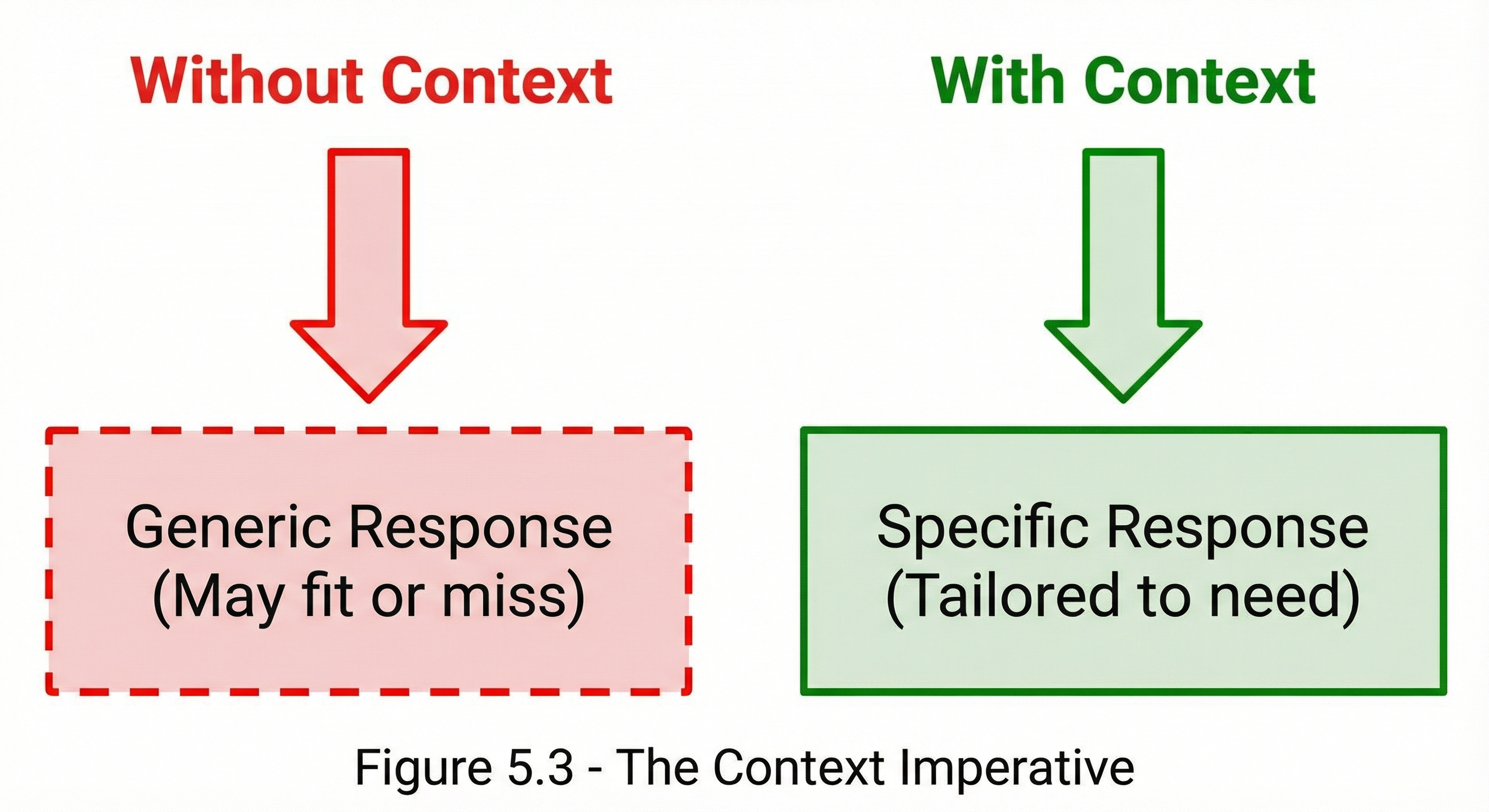 Figure 5.3: The difference context makes—from generic, hit-or-miss responses to tailored, precise outputs.
Context Example
Without Context:
Prompt: "How should I handle this error?"
Response: [Generic error handling advice]
With Context:
Prompt: "I'm building a Node.js REST API using Express. When a user
submits invalid JSON in a POST request, I get 'SyntaxError: Unexpected
token'. How should I handle this error gracefully?"

Response: [Specific Express middleware solution with code]
Types of Context
The Context Taxonomy
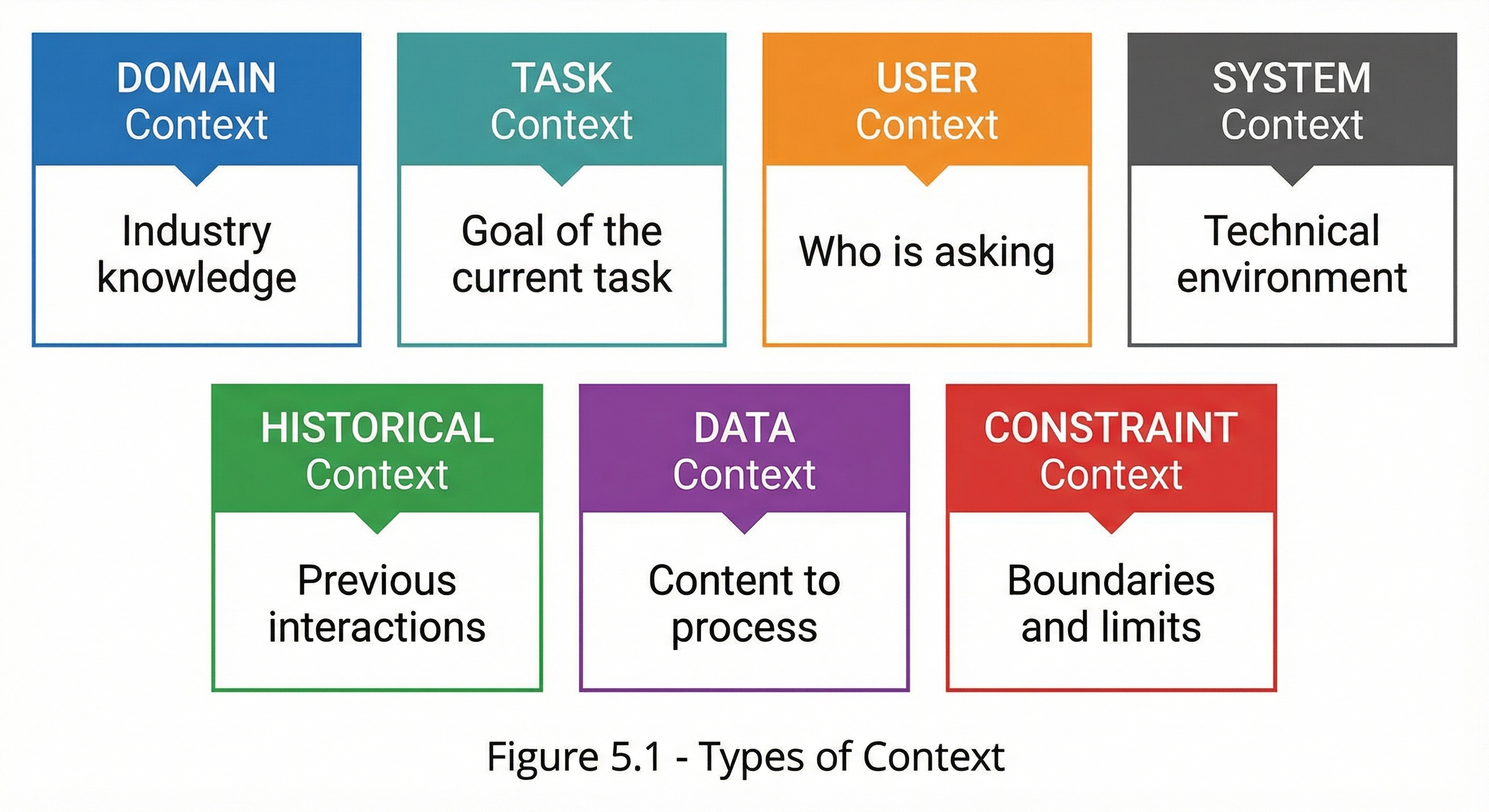 Figure 5.1: The seven types of context that inform effective prompting, from domain expertise to constraint boundaries.
Context Type Details
| Type | Description | Examples |
|---|---|---|
| Domain | Industry, field, or specialty area | Healthcare, finance, legal |
| Task | The goal of the current request | Write, analyze, debug, explain |
| User | Information about the requester | Role, expertise level, needs |
| System | Technical environment details | Language, framework, constraints |
| Historical | Prior relevant information | Previous conversations, decisions |
| Data | Content to be processed | Documents, code, datasets |
| Constraint | Boundaries and requirements | Time limits, format rules |
Domain Context
Purpose
Domain context establishes the field or industry, enabling appropriate terminology, assumptions, and approaches.
Domain Context Elements
| Element | Description | Example |
|---|---|---|
| Industry | Sector or vertical | “In pharmaceutical manufacturing…” |
| Specialization | Specific area within field | “For regulatory compliance…” |
| Terminology | Expected vocabulary | “Use FDA-compliant terminology” |
| Standards | Relevant frameworks | “Following HIPAA requirements…” |
Domain Context Example
**Domain Context:**
This is for a Series B fintech startup in the payments space.
We're subject to PCI-DSS compliance requirements and operate
in the US market. Our engineering team uses Java/Spring Boot
for backend services.

**Request:**
Design an audit logging system for payment transactions.
Task Context
Purpose
Task context clarifies what you’re trying to accomplish and why.
Task Context Elements
| Element | Description | Example |
|---|---|---|
| Goal | What you want to achieve | “I need to reduce API latency” |
| Motivation | Why you’re doing this | “Users are complaining about slow load times” |
| Scope | Boundaries of the task | “Focus only on the authentication flow” |
| Success Criteria | How to measure success | “Target is sub-200ms response time” |
Task Context Example
**Task Context:**
Goal: Refactor our user authentication module
Motivation: Current implementation has security vulnerabilities
identified in our recent audit
Scope: Authentication and session management only (not authorization)
Success Criteria: Pass all security audit requirements and maintain
current performance levels

**Request:**
Review the current auth implementation and propose improvements.
User Context
Purpose
User context helps tailor responses to the right level and perspective.
User Context Elements
| Element | Description | Example |
|---|---|---|
| Role | Job function or position | “I’m a junior developer…” |
| Expertise | Skill level in relevant areas | “I’m new to Docker…” |
| Perspective | What viewpoint to take | “From a project manager’s view…” |
| Needs | Specific requirements | “I need to explain this to non-technical stakeholders” |
User Context Example
**User Context:**
I'm a data scientist with strong Python skills but limited
experience with cloud infrastructure. I need to deploy my
ML model but have never worked with AWS before.

**Request:**
Guide me through deploying a scikit-learn model on AWS.
System Context
Purpose
System context specifies the technical environment and constraints.
System Context Elements
| Element | Description | Example |
|---|---|---|
| Technology Stack | Languages, frameworks | “Using React 18 with TypeScript” |
| Environment | Where code runs | “Production on AWS Lambda” |
| Constraints | Technical limitations | “Must support Node 14.x” |
| Integration | Connected systems | “Integrates with Stripe API” |
System Context Example
**System Context:**
- Language: Python 3.9
- Framework: FastAPI
- Database: PostgreSQL 14
- Deployment: Docker containers on Kubernetes
- Current issue: Memory spikes during heavy load

**Request:**
Identify potential memory leak sources in FastAPI applications.
Context Loading Strategies
Strategy 1: Layered Context
Build context in layers from general to specific:
**Layer 1 - Domain:**
Healthcare insurance claims processing

**Layer 2 - Task:**
Automating initial claim validation

**Layer 3 - System:**
Python-based rules engine, input from JSON API

**Layer 4 - Specific:**
Need to validate diagnosis codes against procedure codes

**Request:**
Write validation logic for ICD-10 to CPT code matching.
Strategy 2: Progressive Disclosure
Start minimal, add context as needed:
Round 1: Basic request
Round 2: Add domain context based on initial response
Round 3: Add constraints based on refined response
Round 4: Final refinements with full context
Strategy 3: Template-Based Context
Use consistent templates for similar tasks:
## Project Context Template

**Project:** [Name]
**Tech Stack:** [Technologies]
**Team Size:** [Number]
**Stage:** [Development phase]
**Constraints:** [Key limitations]

---

[Specific request]
Strategy 4: Reference Context
Point to shared understanding:
Continuing from our previous discussion about the payment
processing refactor, specifically the issue with timeout
handling in the checkout flow...
Context Optimization
The Context Budget
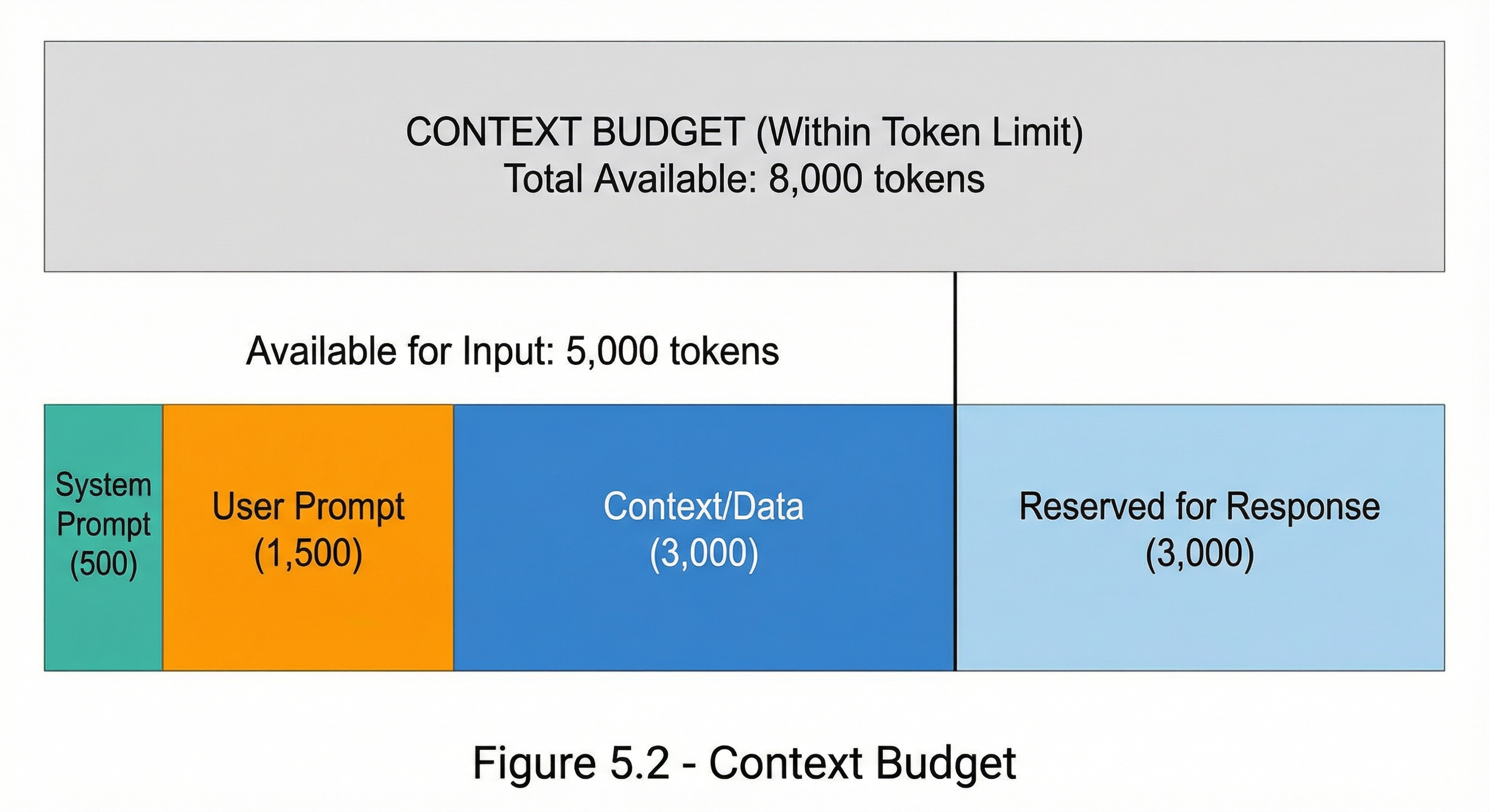 Figure 5.2: Token budget allocation showing how context competes with other prompt components for available input space.
Context Prioritization
When context must be trimmed, prioritize:
| Priority | Context Type | Rationale |
|---|---|---|
| 1 | Task-critical | Directly affects output quality |
| 2 | Constraint | Prevents invalid outputs |
| 3 | Domain | Ensures appropriate framing |
| 4 | Background | Nice to have but not essential |
Context Compression Techniques
| Technique | Description | Example |
|---|---|---|
| Summarization | Condense lengthy context | Full doc → Key points |
| Abstraction | Remove unnecessary detail | Specific → General |
| Referencing | Point to assumed knowledge | “Using standard REST conventions…” |
| Chunking | Process in parts | Large doc → Sections |
Context Quality Indicators
Good Context Characteristics
| Indicator | Description |
|---|---|
| Relevant | Directly relates to the task |
| Specific | Precise, not vague |
| Accurate | Factually correct |
| Complete | Includes all necessary info |
| Concise | No unnecessary padding |
| Organized | Logically structured |
Context Quality Checklist
- Is every piece of context necessary for the task?
- Would removing any context change the output quality?
- Is the context accurate and up-to-date?
- Is it organized in a logical flow?
- Are technical terms and acronyms explained or standard?
Common Context Mistakes
Mistake 1: Context Overload
Problem: Too much irrelevant information drowns the signal.
❌ BAD: [3 pages of company history, org chart, irrelevant
project details, then the actual question]

✅ GOOD: [Relevant context only, then clear question]
Mistake 2: Missing Critical Context
Problem: Assuming the AI knows things it doesn’t.
❌ BAD: "Fix the bug in the handleSubmit function"
(What file? What language? What's the bug?)

✅ GOOD: "In our React app (src/components/Form.js), the
handleSubmit function throws a TypeError when the email
field is empty. Here's the current code: [code]"
Mistake 3: Stale Context
Problem: Outdated information leads to outdated advice.
❌ BAD: "We're using React 16" (when actually on React 18)

✅ GOOD: "We're using React 18.2 with the new concurrent features
enabled. Our package.json shows react: ^18.2.0"
Mistake 4: Implicit Assumptions
Problem: Relying on unstated assumptions.
❌ BAD: "Optimize this query" (for which database? what's slow?)

✅ GOOD: "Optimize this PostgreSQL query for read performance.
It currently takes 3 seconds on a table with 10M rows. Index on
user_id exists. Query: [query]"
Context Templates
Template: Code Help
Language/Framework: [e.g., Python 3.9, Django 4.0]
File/Location: [e.g., src/auth/views.py]
What it should do: [Expected behavior]
What it actually does: [Current behavior]
Error message (if any): [Full error text]
What I've tried: [Previous attempts]

Code:
[Insert relevant code here]

Request: [Specific question]
Template: Analysis Request
Domain: [Industry/field]
Data Description: [What the data represents]
Data Format: [CSV, JSON, etc. with schema]
Analysis Goal: [What insight you seek]
Constraints: [Time, tools, format requirements]
Audience: [Who will use the analysis]

Data Sample:
[Representative sample]

Request: [Specific analysis needed]
Key Takeaways
- Context is critical—it transforms generic responses into tailored solutions
- Seven context types: Domain, Task, User, System, Historical, Data, Constraint
- Layer context from general to specific
- Optimize context within token budgets through prioritization and compression
- Avoid common mistakes: overload, missing info, staleness, implicit assumptions
- Use templates for consistent context delivery
Summary
Context engineering is perhaps the most important skill in prompting. The right context enables AI to provide responses that fit your exact situation, while poor context leads to generic or misaligned outputs. By understanding the types of context, applying loading strategies, and optimizing within constraints, you ensure your prompts consistently produce relevant, accurate results.
Review Questions
- What are the seven types of context described in this chapter?
- Why is the “layered context” strategy effective?
- How do you prioritize context when token limits are tight?
- What are three common context mistakes?
- When would you use progressive disclosure vs. template-based context?
Practical Exercise
Exercise 5.1: Context Audit
Take a prompt you’ve recently used that produced suboptimal results. Analyze it for:
- What context types were present?
- What context was missing?
- Was any context irrelevant?
- Rewrite the prompt with improved context.
Exercise 5.2: Context Compression
Take a prompt with extensive context (500+ words of background) and compress it to under 200 words while maintaining all information critical to the task.