Chapter 4: Prompt Architecture Patterns
Structural Frameworks for Effective Prompt Design
Learning Objectives
After completing this chapter, you will be able to:
- Describe the anatomy of a well-structured prompt
- Apply common prompt architecture patterns (CRAFT, RISEN, CO-STAR)
- Select the appropriate pattern for different use cases
- Compose prompts using building blocks
- Create reusable prompt templates
The Anatomy of Effective Prompts
Structural Overview
Every effective prompt shares common structural elements, though not all elements are required for every prompt:
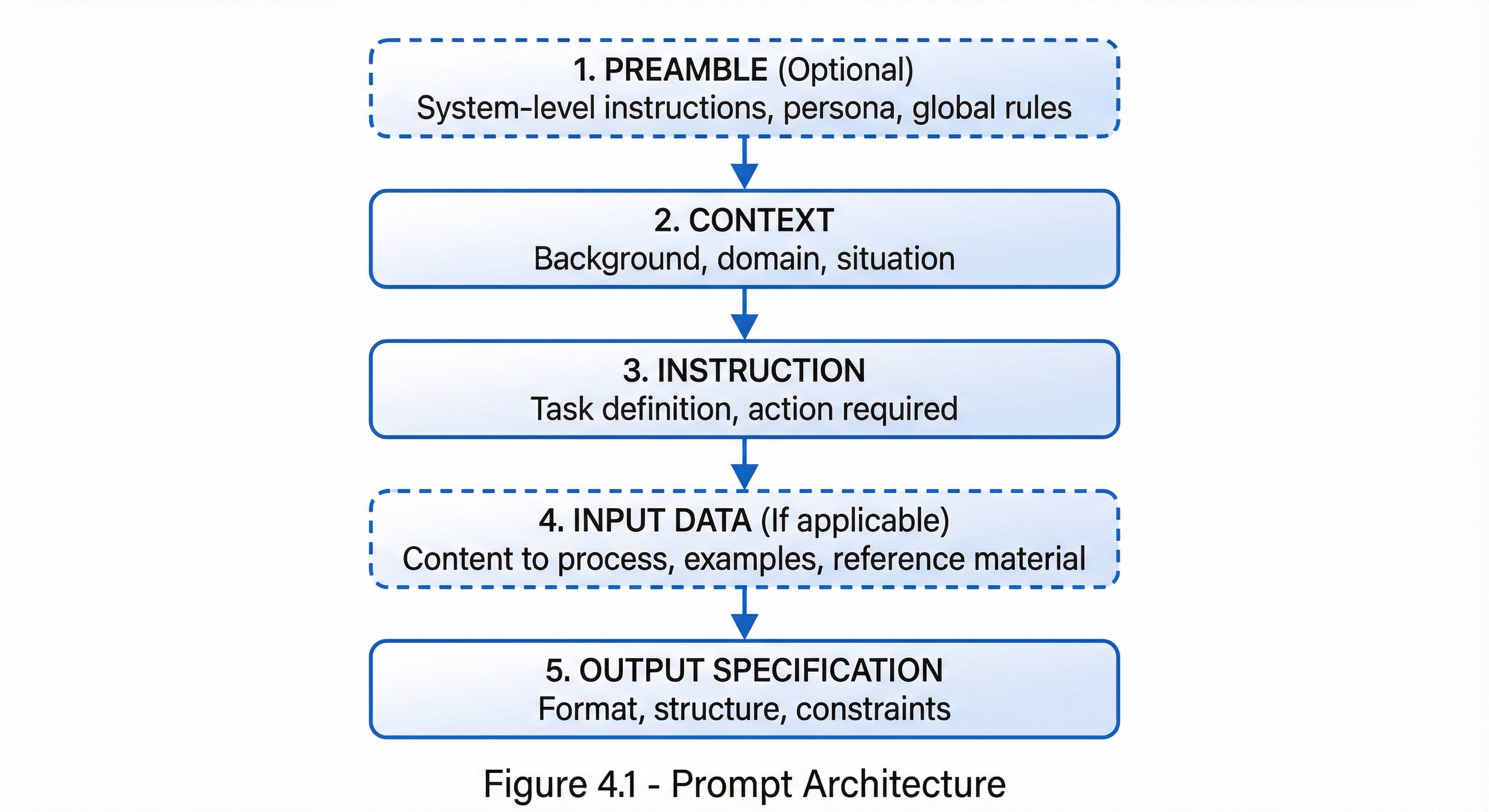 Figure 4.1: The five structural components of effective prompt architecture, showing the recommended sequence from preamble to output specification.
Component Details
| Component | Purpose | Required? |
|---|---|---|
| Preamble | Set global behavior and persona | Optional |
| Context | Provide necessary background | Usually |
| Instruction | Define the task | Always |
| Input Data | Supply content to process | When applicable |
| Output Spec | Control response format | Recommended |
The CRAFT Framework
Overview
CRAFT is a versatile prompt architecture pattern suitable for most everyday prompting needs.
C - Context
R - Role
A - Action
F - Format
T - Tone
CRAFT Components
| Letter | Component | Description |
|---|---|---|
| C | Context | Background information and situation |
| R | Role | Who the AI should act as |
| A | Action | The specific task to perform |
| F | Format | How to structure the output |
| T | Tone | The voice and style to use |
CRAFT Example
**Context:**
Our company is launching a new project management tool designed for
small creative agencies (5-20 employees). We're targeting design
studios, ad agencies, and content production houses.

**Role:**
You are an experienced product marketing specialist with expertise
in B2B SaaS marketing for creative industries.

**Action:**
Write a landing page headline and three supporting value propositions
that will resonate with our target audience.

**Format:**
- One headline (maximum 10 words)
- Three value propositions (each 15-20 words)
- Each value proposition should address a specific pain point

**Tone:**
Professional but creative. Use language that appeals to designers
and creatives—avoid corporate jargon.
When to Use CRAFT
| Use Case | Suitability |
|---|---|
| Content creation | Excellent |
| Marketing copy | Excellent |
| General writing | Good |
| Technical documentation | Good |
| Code generation | Moderate |
| Analysis tasks | Moderate |
The RISEN Framework
Overview
RISEN provides more structure for complex tasks requiring clear process steps.
R - Role
I - Instructions
S - Steps
E - End goal
N - Narrowing (constraints)
RISEN Components
| Letter | Component | Description |
|---|---|---|
| R | Role | Persona or expertise to embody |
| I | Instructions | High-level task description |
| S | Steps | Specific process to follow |
| E | End goal | Desired outcome definition |
| N | Narrowing | Constraints and limitations |
RISEN Example
**Role:**
You are a senior data analyst specializing in e-commerce analytics.

**Instructions:**
Analyze the provided customer purchase data to identify high-value
customer segments for a targeted marketing campaign.

**Steps:**
1. Calculate RFM scores (Recency, Frequency, Monetary) for each customer
2. Cluster customers into 4-5 segments based on RFM scores
3. Profile each segment with descriptive statistics
4. Rank segments by potential marketing ROI
5. Recommend targeting priorities

**End Goal:**
A clear recommendation of which 2-3 customer segments to prioritize
for our upcoming marketing campaign, with justification.

**Narrowing:**
- Focus on customers active in the last 12 months
- Budget constraint: can only target 30% of customer base
- Campaign goal is increasing repeat purchases, not acquisition
- Output should be actionable by non-technical marketing team
When to Use RISEN
| Use Case | Suitability |
|---|---|
| Multi-step analysis | Excellent |
| Process-oriented tasks | Excellent |
| Research projects | Good |
| Technical procedures | Good |
| Simple questions | Overkill |
The CO-STAR Framework
Overview
CO-STAR emphasizes the communication aspects of prompting.
C - Context
O - Objective
S - Style
T - Tone
A - Audience
R - Response format
CO-STAR Components
| Letter | Component | Description |
|---|---|---|
| C | Context | Relevant background information |
| O | Objective | What you want to achieve |
| S | Style | Writing style (formal, casual, etc.) |
| T | Tone | Emotional register (friendly, serious) |
| A | Audience | Who will read/use the output |
| R | Response | Desired format and structure |
CO-STAR Example
**Context:**
Our healthcare startup just received FDA clearance for our AI-powered
diagnostic device. This is our first major regulatory milestone.

**Objective:**
Write a press release announcing this achievement that will generate
media coverage and build credibility with potential investors.

**Style:**
Professional business journalism style. Factual and authoritative
with strategic quotes.

**Tone:**
Confident and optimistic, but not overly promotional. Emphasize
scientific rigor and patient safety.

**Audience:**
- Primary: Healthcare industry journalists
- Secondary: Potential investors and partners
- Tertiary: Healthcare providers who might adopt the technology

**Response:**
Standard press release format:
- Headline
- Dateline and lead paragraph
- 2-3 body paragraphs with key details
- Quote from CEO
- Boilerplate about company
- Media contact information
When to Use CO-STAR
| Use Case | Suitability |
|---|---|
| PR and communications | Excellent |
| Audience-specific content | Excellent |
| Marketing materials | Good |
| Educational content | Good |
| Technical writing | Moderate |
The RTF Framework
Overview
RTF is a minimalist framework for quick, focused prompts.
R - Role
T - Task
F - Format
RTF Example
**Role:** Technical writer

**Task:** Explain how HTTPS encryption works

**Format:** 5 bullet points suitable for non-technical readers
When to Use RTF
Best for:
- Quick tasks
- Simple requests
- When context is minimal
- Rapid prototyping prompts
Pattern Selection Guide
Decision Matrix
| Need | Recommended Pattern |
|---|---|
| Quick, simple request | RTF |
| Content with specific voice | CRAFT |
| Multi-step process | RISEN |
| Audience-focused communication | CO-STAR |
Selection Flowchart
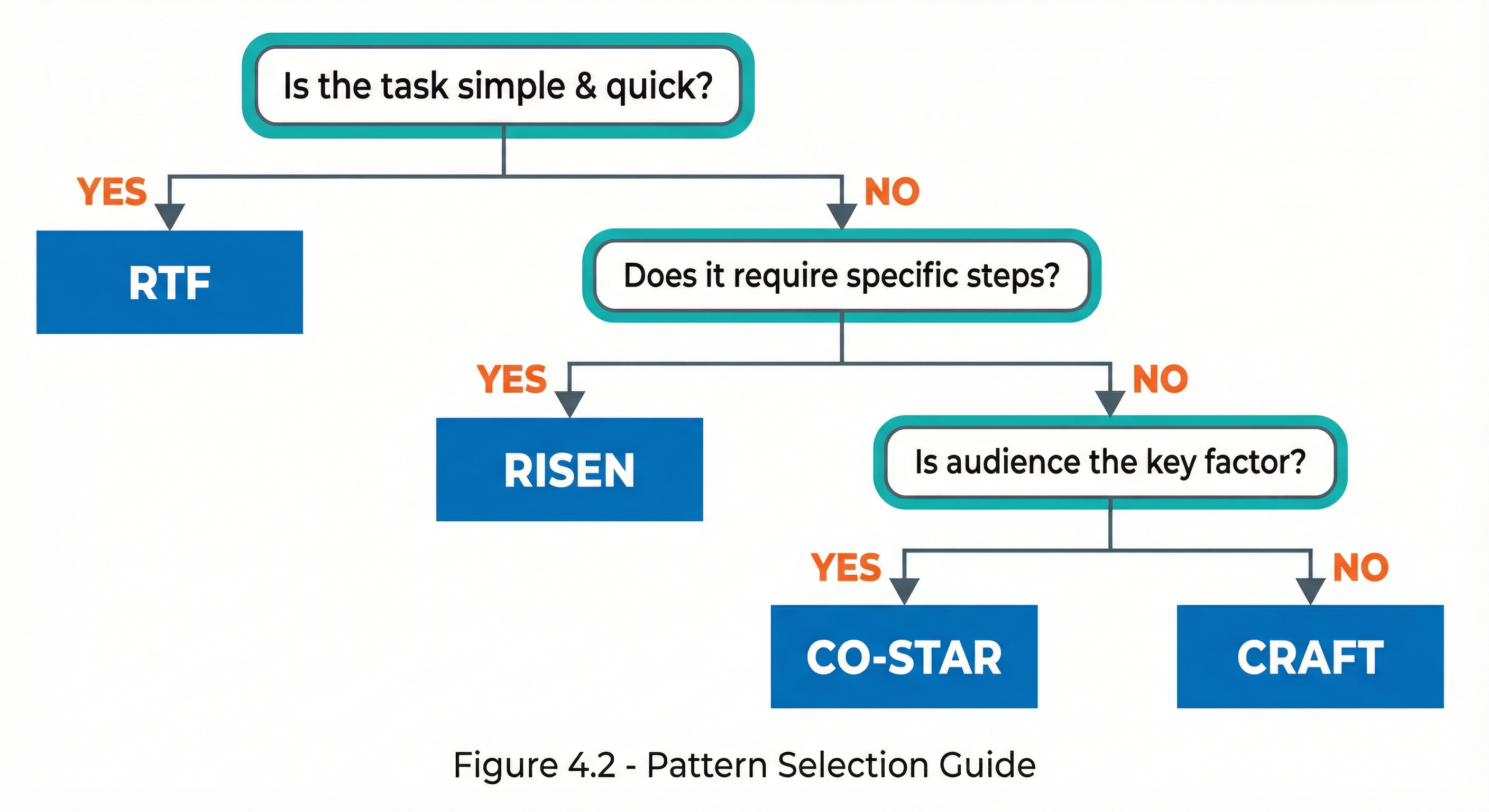 Figure 4.2: Decision flowchart for selecting the appropriate prompting framework based on task characteristics.
Building Blocks Approach
Modular Prompt Components
Rather than always using complete frameworks, you can build prompts from modular components:
Core Blocks
| Block | Purpose | Example |
|---|---|---|
| Role Block | Set expertise | “You are a [role]…” |
| Context Block | Provide background | “Background: [context]” |
| Task Block | Define action | “Your task is to [action]” |
| Input Block | Supply data | “Given the following: [data]” |
| Format Block | Specify output | “Format as: [format]” |
| Constraint Block | Set boundaries | “Constraints: [limits]” |
| Example Block | Provide samples | “Example: [example]” |
Block Composition
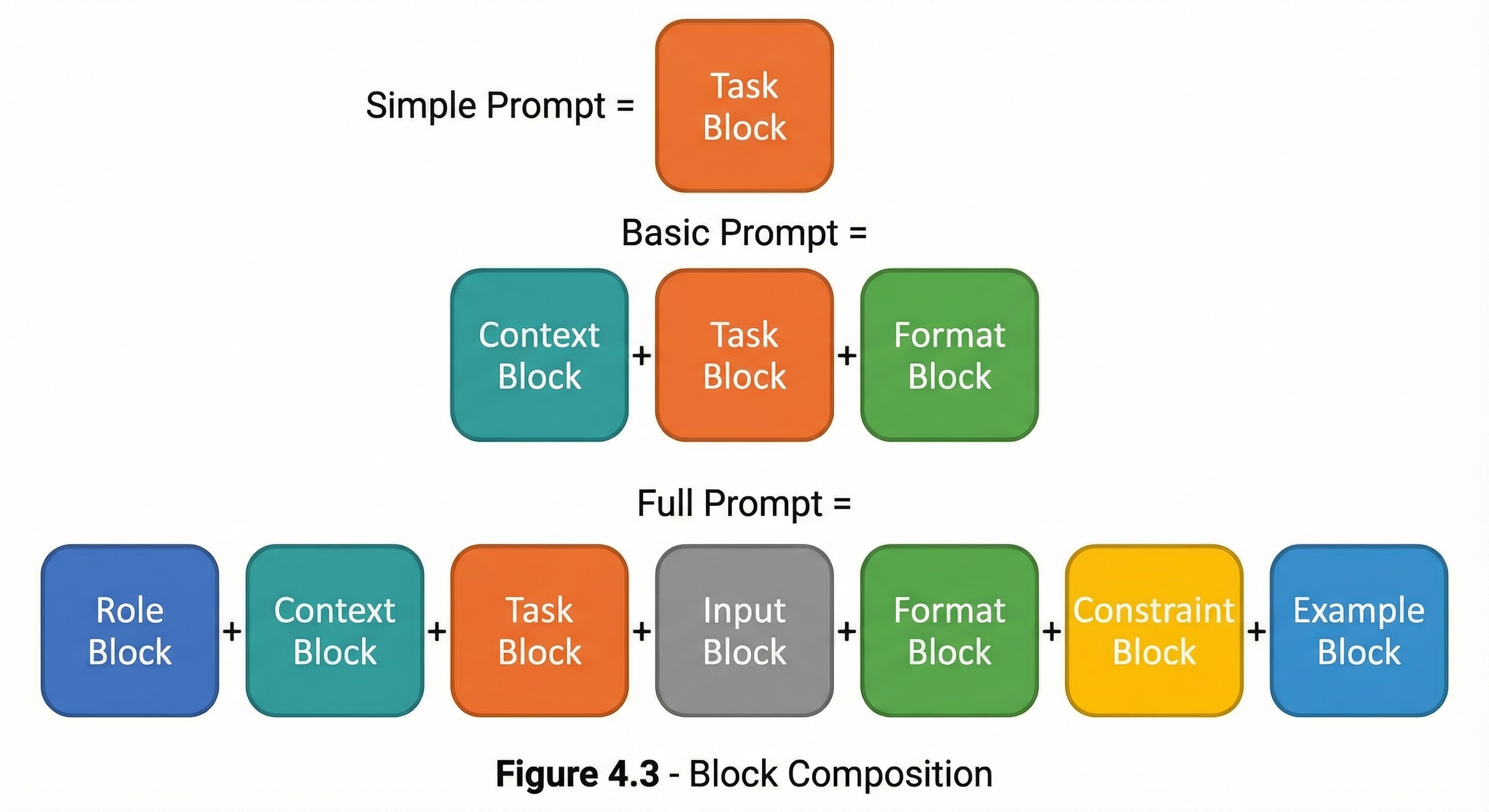 Figure 4.3: Modular building blocks combine to create prompts of varying complexity, from simple single-block prompts to comprehensive seven-block structures.
Template Development
Creating Reusable Templates
Templates allow you to standardize prompts for recurring tasks:
Template Structure
# [Template Name]

## Purpose
[What this template is for]

## Variables
- {variable_1}: [Description]
- {variable_2}: [Description]

## Template

---
[Your role is {role}.]

Context: {context}

Task: {task}

Requirements:
- {requirement_1}
- {requirement_2}

Format: {output_format}
---

## Usage Example
[Filled-in example]
Example Template: Code Review
Purpose: Systematic code review with consistent criteria
Variables:
{language}: Programming language{code}: Code to review{focus_areas}: Specific concerns
Template:
You are a senior {language} developer conducting a code review.

Review the following code for:
1. Correctness and potential bugs
2. Performance issues
3. Security vulnerabilities
4. Code style and readability
5. {focus_areas}

Code to review:
[Insert code here]

Provide your review as:
- Issues Found: Numbered list with severity (Critical/Major/Minor)
- Positive Observations: What's done well
- Recommendations: Specific improvements
Usage Example (with variables filled in):
| Variable | Value |
|---|---|
{language} | Python |
{code} | def process_user_data(data): result = eval(data['formula'])... |
{focus_areas} | Error handling patterns |
Anti-Patterns to Avoid
Common Architectural Mistakes
| Anti-Pattern | Problem | Solution |
|---|---|---|
| Wall of Text | No structure, hard to parse | Use clear sections |
| Missing Context | AI guesses incorrectly | Provide relevant background |
| Vague Instructions | Unpredictable results | Be specific and direct |
| No Format Spec | Unusable output | Specify format explicitly |
| Kitchen Sink | Overwhelming, confused focus | Focus on essentials |
Before and After
Before (Anti-pattern):
I need you to help me write something for my boss about the project
we've been working on that shows the results and makes us look good
but is also honest and professional and not too long.
After (Structured):
**Role:** Business communications specialist

**Context:**
We completed a 3-month software modernization project that:
- Reduced page load times by 40%
- Decreased server costs by 25%
- Some features were delayed to Phase 2

**Task:** Write a project summary for executive leadership

**Format:**
- 200-250 words
- Executive summary style
- Include: achievements, metrics, lessons learned
- Tone: Professional, balanced, factual

**Constraint:** Acknowledge the delayed features without dwelling on them
Key Takeaways
- Prompt architecture provides structure for effective communication
- CRAFT, RISEN, CO-STAR, and RTF offer different approaches for different needs
- Select patterns based on task complexity and requirements
- Building blocks allow flexible prompt composition
- Templates enable consistency and reusability
- Avoid anti-patterns like walls of text and vague instructions
Summary
Prompt architecture patterns transform ad-hoc prompting into a systematic discipline. By using frameworks like CRAFT, RISEN, and CO-STAR, you ensure your prompts include all necessary elements in a logical structure. Choose patterns based on your specific needs, and don’t hesitate to adapt them or build from modular components. Well-architected prompts consistently produce better results than unstructured requests.
Review Questions
- What are the five components of the CRAFT framework?
- When would you choose RISEN over CRAFT?
- What distinguishes CO-STAR from other frameworks?
- What is the purpose of the “Narrowing” component in RISEN?
- Name three prompt anti-patterns and their solutions.
Practical Exercise
Exercise 4.1: Pattern Application
Choose a task you commonly perform with AI and write three versions of the prompt using:
- CRAFT framework
- RISEN framework
- RTF framework
Compare the results and note which produced the best output for your specific task.
Exercise 4.2: Template Creation
Create a reusable template for a task you perform frequently. Include:
- Clear purpose statement
- Variable definitions
- Complete template structure
- One filled-in example