Chapter 2: Core Concepts and Terminology
Essential Vocabulary and Foundational Concepts
Learning Objectives
After completing this chapter, you will be able to:
- Define key prompting terminology accurately
- Describe the anatomy of a prompt
- Explain tokens and context windows
- Understand how AI models process prompts
- Apply terminology correctly in discussions
The Language of Prompting
Before diving into techniques and frameworks, we need a shared vocabulary. This chapter establishes the essential terms and concepts that will be used throughout this handbook.
Why Terminology Matters
Clear terminology enables:
- Precise communication about techniques
- Accurate diagnosis of problems
- Effective knowledge transfer between practitioners
- Consistent documentation of practices
Core Definitions
Prompt
A prompt is the input provided to an AI model to elicit a response. It can range from a simple question to a complex, multi-component instruction set.
Simple Prompt:
"What is the capital of France?"

Complex Prompt:
"You are a senior financial analyst. Review the following quarterly
report and provide: 1) Key performance highlights, 2) Areas of concern,
3) Recommendations for Q3. Format as a bulleted executive summary."
Prompt Engineering
Prompt engineering is the discipline of designing, testing, and optimizing prompts to achieve desired outcomes from AI systems. It encompasses both the art (creativity, intuition) and science (systematic testing, measurement) of prompt creation.
Completion / Response / Output
The completion (also called response or output) is what the AI model generates in reply to a prompt. The quality of the completion depends heavily on the quality of the prompt.
Large Language Model (LLM)
A Large Language Model is an AI system trained on vast amounts of text data to understand and generate human-like text. Examples include GPT-4, Claude, Gemini, and Llama.
Anatomy of a Prompt
Basic Components
Every prompt can be analyzed in terms of its components:
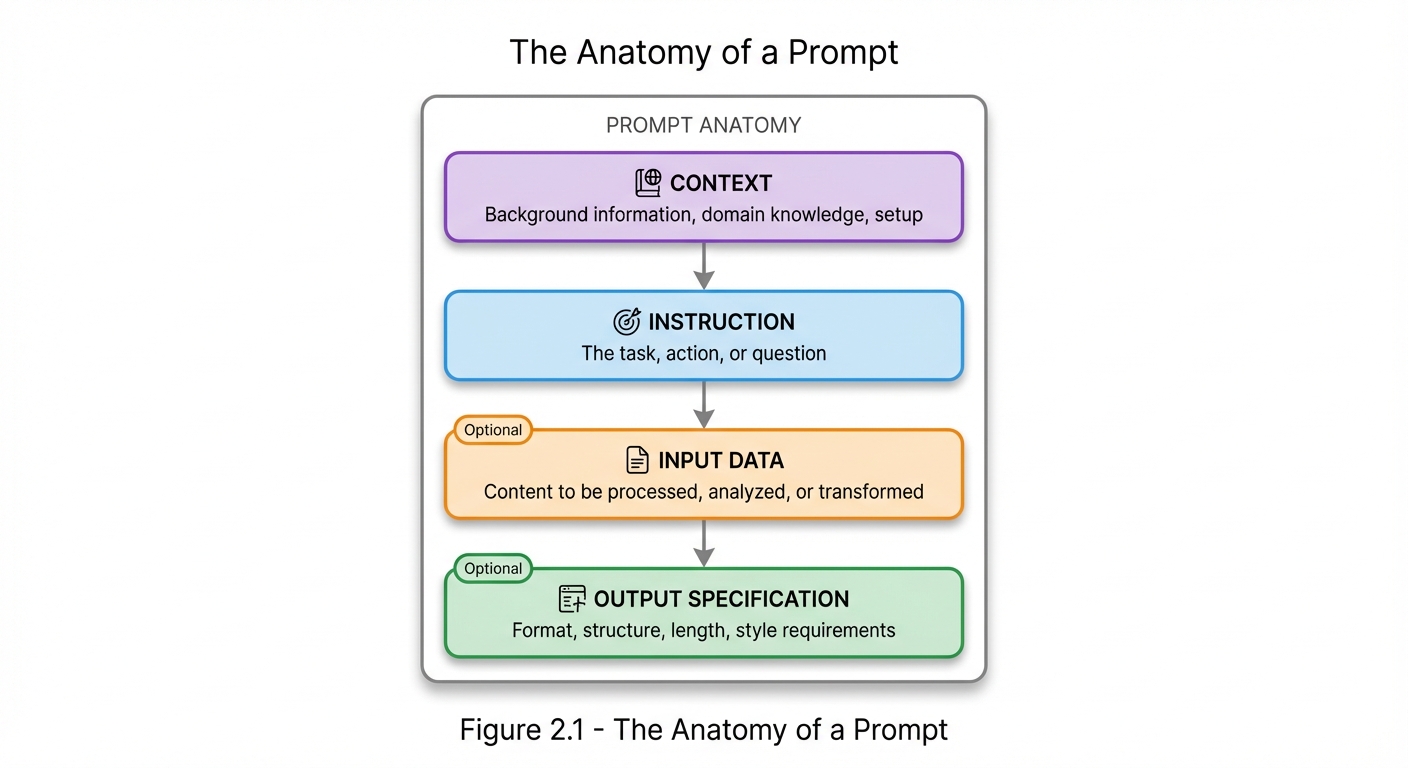 Figure 2.1: The Anatomy of a Prompt - Every prompt consists of these four components: Context (background), Instruction (task), Input Data (content to process), and Output Specification (format requirements). Input Data and Output Specification are optional but often critical for quality results.
Component Definitions
| Component | Purpose | Example |
|---|---|---|
| Context | Sets the stage | “You are a medical professional…” |
| Instruction | Defines the task | “Diagnose the following symptoms…” |
| Input Data | Provides content | “Patient presents with: fever, cough…” |
| Output Spec | Controls format | “Provide top 3 possibilities with confidence levels” |
Example Breakdown
**Prompt:**
You are an experienced Python developer specializing in data analysis.  [CONTEXT]
Review the following code and identify any bugs or inefficiencies.      [INSTRUCTION]

```python
def calculate_average(numbers):
    total = 0
    for n in numbers:
        total = total + n
    return total / len(numbers)
```                                                                       [INPUT DATA]

Provide your analysis as:
1. Issues found (numbered list)
2. Corrected code
3. Brief explanation of changes                                          [OUTPUT SPEC]
Tokens and Tokenization
What Are Tokens?
Tokens are the basic units that AI models use to process text. A token can be a word, part of a word, or a character, depending on the tokenizer used.
Tokenization Examples
| Text | Approximate Tokens |
|---|---|
| “Hello” | 1 token |
| “Hello, world!” | 3-4 tokens |
| “Artificial Intelligence” | 2-3 tokens |
| “supercalifragilisticexpialidocious” | 7-9 tokens |
Why Tokens Matter
- Cost: Most AI services charge per token
- Limits: Models have maximum token limits
- Efficiency: More tokens = more processing time
- Context: Available space for information
Token Rules of Thumb
- English text: ~4 characters per token (average)
- 1,000 tokens: ~750 words
- Code: Often tokenizes less efficiently than prose
- Special characters: May consume extra tokens
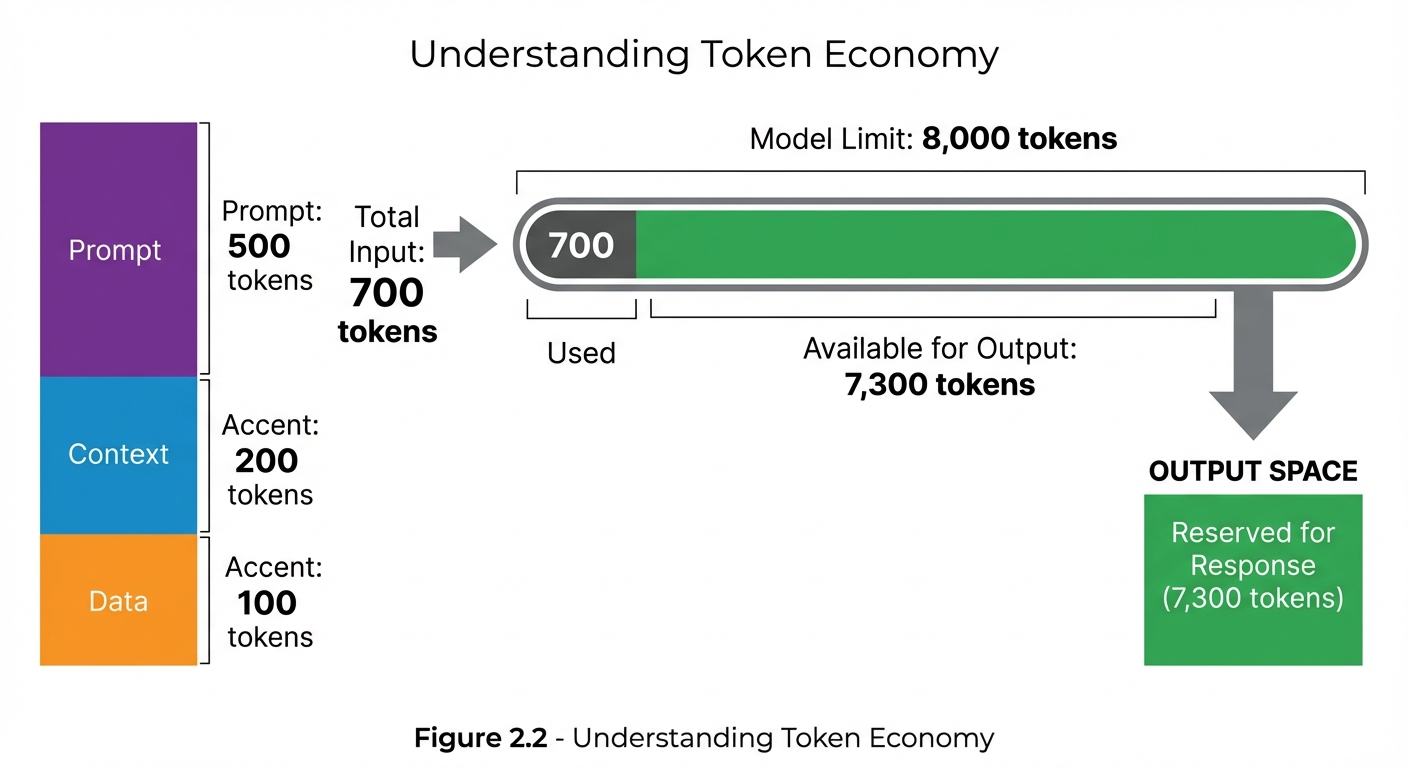 Figure 2.2: Token Economy - Understanding how tokens are allocated helps optimize prompts. In this example, 700 input tokens leave 7,300 tokens available for the response within an 8,000-token context window.
Context Windows
What Is a Context Window?
The context window is the maximum number of tokens an AI model can process in a single interaction. It includes both the prompt (input) and the completion (output).
Context Window Sizes
| Model (Example) | Context Window |
|---|---|
| GPT-3.5 | 4K - 16K tokens |
| GPT-4 | 8K - 128K tokens |
| Claude 3 | 200K tokens |
| Gemini | 32K - 1M tokens |
Managing Context
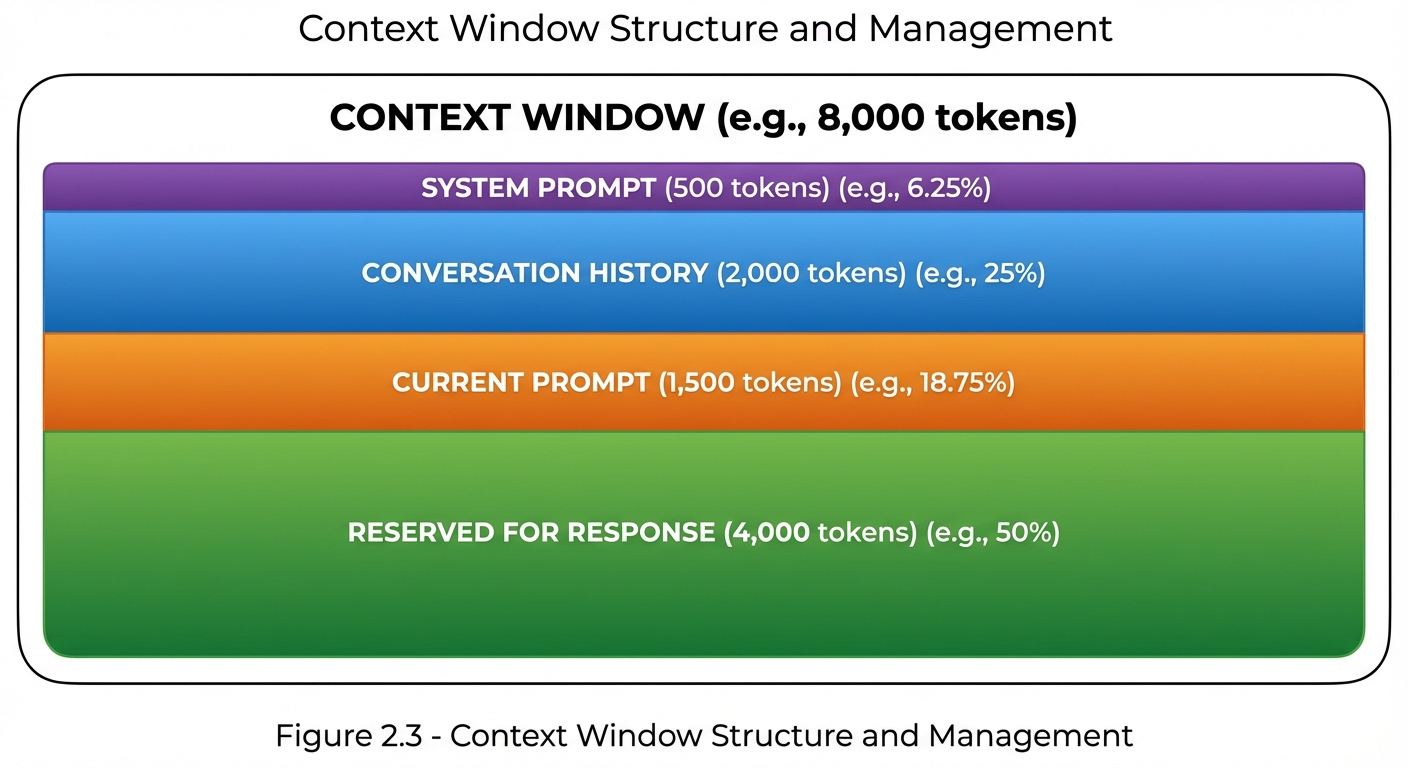 Figure 2.3: Context Window Management - The context window must accommodate system prompts, conversation history, current prompts, and response space. Strategic allocation ensures sufficient room for quality outputs.
Context Window Strategies
| Strategy | When to Use |
|---|---|
| Summarization | Long conversations, historical context |
| Truncation | Less important older content |
| Chunking | Processing long documents |
| Prioritization | Limited space, critical information |
Prompt Types
Zero-Shot Prompts
Zero-shot prompts ask the model to perform a task without any examples:
Classify the following text as positive, negative, or neutral:
"The product arrived quickly but the quality was disappointing."
Few-Shot Prompts
Few-shot prompts include examples to guide the model:
Classify the sentiment:

Text: "I love this product!" → Positive
Text: "Worst purchase ever." → Negative
Text: "It's okay, nothing special." → Neutral

Text: "The product arrived quickly but the quality was disappointing." →
Chain-of-Thought Prompts
Chain-of-thought prompts encourage step-by-step reasoning:
Solve this problem step by step:
If a train travels at 60 mph for 2.5 hours, then at 80 mph for 1.5 hours,
what is the total distance traveled?
Key Terminology Glossary
| Term | Definition |
|---|---|
| Prompt | Input provided to an AI model |
| Completion | Output generated by the model |
| Token | Basic unit of text processing |
| Context Window | Maximum tokens processable |
| Zero-Shot | No examples provided |
| Few-Shot | Examples included |
| Chain-of-Thought | Step-by-step reasoning |
| System Prompt | Persistent behavioral instructions |
| User Prompt | Individual request or query |
| Temperature | Randomness/creativity control |
| Top-p | Probability threshold for token selection |
| Max Tokens | Limit on response length |
| Stop Sequence | Text that terminates generation |
| Hallucination | Plausible but incorrect output |
| Grounding | Anchoring to provided facts |
| Prompt Injection | Malicious input manipulation |
Model Parameters
Temperature
Temperature controls the randomness of outputs:
| Value | Effect |
|---|---|
| 0.0 | Deterministic, focused |
| 0.5 | Balanced |
| 1.0 | Creative, varied |
| >1.0 | Highly random |
Top-p (Nucleus Sampling)
Top-p limits token selection to a cumulative probability:
Top-p = 0.9 means:
Consider only tokens that together account for 90% probability
Max Tokens
Max tokens limits the response length:
max_tokens = 500
Model will stop generating after ~500 tokens
Stop Sequences
Stop sequences define text that halts generation:
stop = ["###", "END"]
Model stops if it generates "###" or "END"
Understanding Model Behavior
How Models Process Prompts
![Horizontal four-stage pipeline showing how AI models process prompts. Stage 1: Prompt (text input with keyboard icon showing 'Hello'). Stage 2: Tokenize (tokens shown as array [15496] with split icon). Stage 3: Process (model processing through attention layers with brain icon). Stage 4: Output (text result 'Hi there!' with speech bubble icon). Arrows connect each stage showing the transformation flow from left to right.](/StructuredPromptingHandbook/images/Figure_02.4.jpeg) Figure 2.4: Model Processing Flow - Text input is tokenized into numeric IDs, processed through the model’s attention layers and neural networks, then decoded back into readable text output.
Figure 2.4: Model Processing Flow - Text input is tokenized into numeric IDs, processed through the model’s attention layers and neural networks, then decoded back into readable text output.
Key Behaviors to Understand
- Pattern Matching: Models respond based on patterns in training data
- Context Sensitivity: Earlier context influences later generation
- Instruction Following: Models try to follow explicit instructions
- Recency Bias: Recent context often has more influence
- Verbosity Matching: Output length often matches prompt style
Common Misconceptions
Misconception 1: “The model understands me”
Reality: Models process statistical patterns, not meaning. Clear, explicit prompts work better than implied intent.
Misconception 2: “Longer prompts are better”
Reality: Quality over quantity. Concise, relevant prompts often outperform lengthy ones.
Misconception 3: “One perfect prompt exists”
Reality: Optimal prompts vary by model, task, and context. Iteration is essential.
Misconception 4: “The model remembers previous sessions”
Reality: Each session starts fresh unless context is explicitly provided.
Key Takeaways
- Prompts are inputs; completions are outputs
- Tokens are the currency of AI interaction
- Context windows set hard limits on what can be processed
- Parameters (temperature, top-p, max_tokens) control output characteristics
- Clear terminology enables precise communication about prompting
- Understanding model behavior helps craft better prompts
Summary
This chapter established the foundational vocabulary and concepts of prompt engineering. Understanding these terms—prompt, token, context window, zero-shot, few-shot, and others—is essential for discussing techniques, diagnosing problems, and learning from others. With this shared language in place, we can now explore the frameworks and patterns that make structured prompting so powerful.
Review Questions
- What are the four basic components of a prompt?
- Approximately how many tokens is 1,000 words of English text?
- What is the difference between zero-shot and few-shot prompting?
- How does temperature affect model output?
- Why is understanding the context window important?
Practical Exercise
Exercise 2.1: Token Estimation
Estimate the token count for the following prompt, then verify with a tokenizer:
You are a helpful assistant. Please summarize the following article
in exactly three bullet points, focusing on the main arguments:

[300-word article text here]

Format your response as:
• Point 1
• Point 2
• Point 3
Hint: System message (~10 tokens) + Instructions (~30 tokens) + Article (~400 tokens) + Format spec (~20 tokens) ≈ 460 tokens
Chapter Navigation
| Previous | Up | Next |
|---|---|---|
| ← Chapter 1: Introduction | Part I: Foundations | Chapter 3: Prompting Pillars → |