Chapter 6: Change Impact Assessment
Learning Objectives
After completing this chapter, you will be able to:
- Conduct comprehensive change impact assessments
- Identify and document process, role, and skill impacts
- Create “day in the life” analyses that make impacts tangible
- Assess impact severity and prioritize OCM responses
- Develop impact mitigation strategies
What is Change Impact Assessment?
Change Impact Assessment is the systematic process of identifying, analyzing, and documenting how a change will affect people, processes, technology, and organizational structures. It answers the fundamental question: “What will be different, and for whom?”
Impact assessment is distinct from readiness assessment, though the two are related. Readiness assessment evaluates whether the organization is prepared for change; impact assessment identifies what the organization needs to be prepared for. Together, they provide the foundation for OCM planning.
The value of impact assessment lies in its specificity. Generic statements like “this change will affect how people work” are not actionable. Effective impact assessment produces specific, documented impacts: “Customer service representatives will use a new interface for order lookup, requiring 4 hours of training and a 2-week adjustment period during which call handling times may increase by 15%.”
This specificity enables targeted OCM responses. Training can be designed to address actual skill gaps. Communication can address specific concerns. Support can be positioned where it’s actually needed. Without detailed impact assessment, OCM activities become generic and less effective.
Why Impact Assessment Matters
Organizations that skip or shortcut impact assessment encounter predictable problems:
Surprised Stakeholders: People discover impacts they weren’t prepared for, creating resistance and eroding trust.
Misaligned Training: Training addresses theoretical changes rather than actual job impacts, leaving people unprepared.
Inadequate Support: Support resources are positioned based on assumptions rather than actual needs.
Underestimated Effort: The scope of OCM effort required is underestimated because the true scope of impact is unknown.
Missed Stakeholders: Groups affected by the change are overlooked because their connection to the change wasn’t identified.
Impact Dimensions
Effective impact assessment examines multiple dimensions of change. Most changes affect several dimensions simultaneously, and understanding the full scope of impact is essential for comprehensive OCM planning.
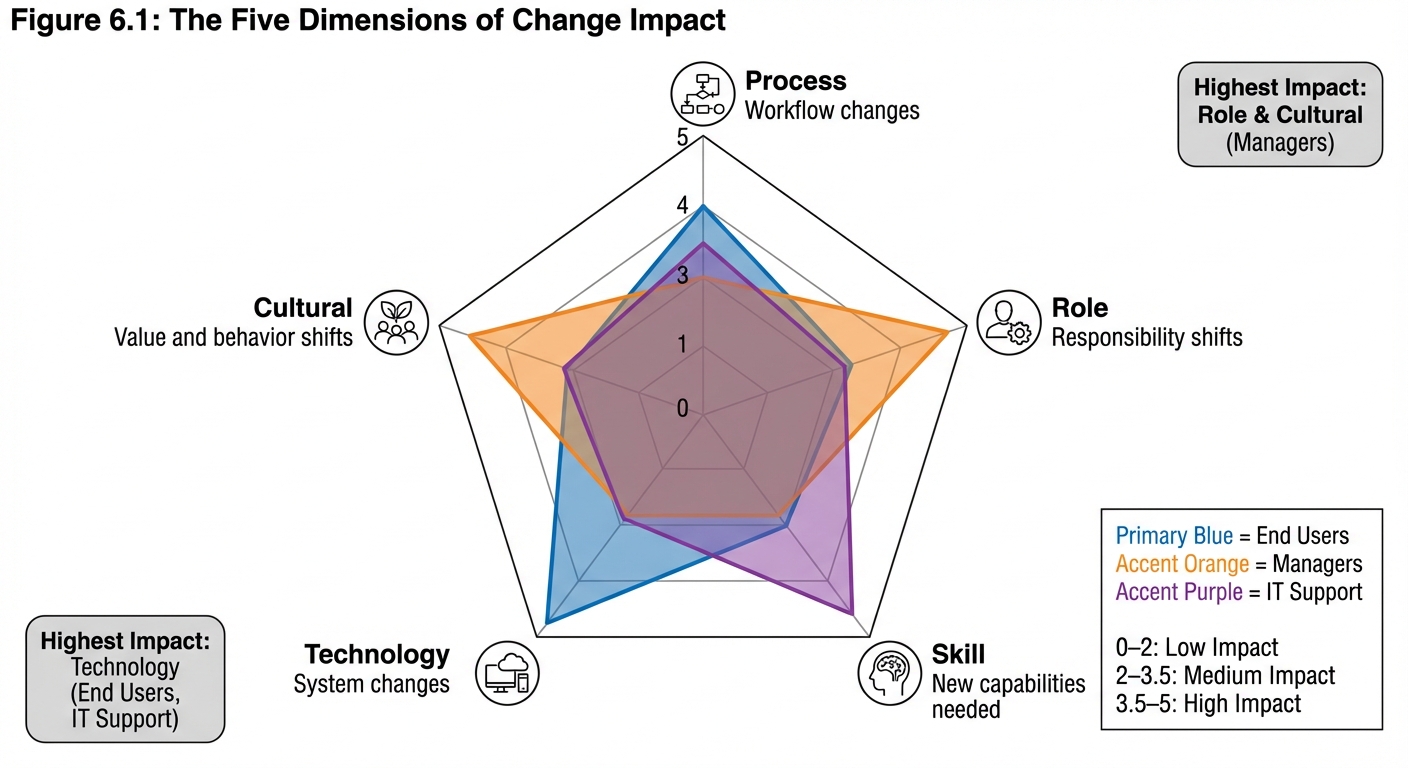
Figure 6.1: Change impact must be assessed across five dimensions: Process (workflow changes), Role (responsibility shifts), Skill (new capabilities needed), Technology (system changes), and Cultural (value and behavior shifts). The radar chart shows impact severity for different stakeholder groups, enabling targeted OCM responses.
Process Impact
Process impacts occur when workflows, procedures, or ways of working change. These are often the most visible impacts and typically the focus of technical change management.
Types of Process Impact:
| Impact Type | Description | Example |
|---|---|---|
| New Process | Entirely new workflow introduced | New approval process for purchases |
| Modified Process | Existing process changed | Additional step added to incident handling |
| Eliminated Process | Current process discontinued | Manual reconciliation replaced by automation |
| Integrated Process | Previously separate processes combined | Separate ordering systems consolidated |
| Timing Change | When or how often process occurs | Monthly reporting becomes real-time |
Assessing Process Impact:
- Document current state process flows
- Map future state process flows
- Identify specific changes at each step
- Determine who performs each step (current and future)
- Assess complexity and frequency of changes
Role Impact
Role impacts occur when job responsibilities, authorities, or reporting relationships change. These impacts often carry significant emotional weight because they affect people’s identity and status.
Types of Role Impact:
| Impact Type | Description | Example |
|---|---|---|
| New Role | Position that didn’t exist before | Data Steward role created |
| Eliminated Role | Position no longer needed | Manual data entry clerk |
| Expanded Role | Additional responsibilities added | Managers now approve expenses |
| Reduced Role | Responsibilities removed | Supervisors no longer review reports |
| Changed Reporting | Different manager or structure | Teams reorganized by customer segment |
Assessing Role Impact:
- Compare current and future organization structures
- Map responsibility changes by position
- Identify authority and decision-right changes
- Document reporting relationship changes
- Assess career path implications
Skill Impact
Skill impacts occur when new knowledge, abilities, or competencies are required. These impacts directly drive training requirements and are critical for successful adoption.
Types of Skill Impact:
| Impact Type | Description | Example |
|---|---|---|
| Technical Skills | New system or tool proficiency | Learning new software interface |
| Process Skills | New procedure or workflow knowledge | Understanding new approval process |
| Analytical Skills | New ways of interpreting information | Using dashboards for decision-making |
| Interpersonal Skills | New ways of interacting | Cross-functional collaboration |
| Leadership Skills | New management approaches | Coaching remote team members |
Assessing Skill Impact:
- Identify skills required in future state
- Assess current skill levels
- Determine skill gaps by role/group
- Evaluate complexity of skill acquisition
- Estimate time to proficiency
Technology Impact
Technology impacts occur when systems, tools, or interfaces change. These impacts are often the driver of organizational change but must be understood from the user perspective, not just the technical perspective.
Assessing Technology Impact:
- Identify systems being added, changed, or retired
- Document interface and workflow changes
- Map integration points with other systems
- Assess data migration and access impacts
- Evaluate hardware or device changes
Cultural Impact
Cultural impacts occur when values, norms, or behavioral expectations change. These are often the most challenging impacts to address because culture is deeply embedded and resistant to direct manipulation.
Types of Cultural Impact:
| Impact Type | Description | Example |
|---|---|---|
| Value Shift | Core beliefs change | From “follow the rules” to “use judgment” |
| Norm Change | Expected behaviors change | From individual work to collaboration |
| Power Shift | Influence patterns change | Decision authority moves to front line |
| Identity Shift | How groups see themselves | From “order takers” to “consultants” |
Impact Assessment Process
Step 1: Gather Change Information
Before assessing impacts, thoroughly understand what is changing:
- Review project documentation and requirements
- Interview project team members and subject matter experts
- Examine technical designs and specifications
- Understand business process changes
- Clarify what’s in scope and out of scope
Step 2: Identify Impacted Groups
Determine who will be affected by the change:
- Map stakeholder groups to change components
- Identify primary (directly affected) and secondary (indirectly affected) groups
- Consider geographic, functional, and hierarchical dimensions
- Don’t forget support functions, customers, and partners
Step 3: Document Current State
For each impacted group, document the current state:
- Current processes and workflows
- Current roles and responsibilities
- Current systems and tools
- Current skills and competencies
- Current metrics and performance expectations
Step 4: Document Future State
Document what will be different after the change:
- New processes and workflows
- New roles and responsibilities
- New systems and tools
- New skills required
- New metrics and performance expectations
Step 5: Analyze Gaps
Compare current and future states to identify specific impacts:
| Current State | Future State | Impact | Severity |
|---|---|---|---|
| Manual order entry in System A | Automated entry via web portal | Learn new interface, different workflow | Medium |
| Manager approves all requests | System auto-approves under $500 | Reduced approval workload, new exception handling | Low |
| Weekly batch reporting | Real-time dashboard access | New analytical skills, continuous monitoring | High |
Step 6: Assess Impact Severity
Not all impacts are equal. Assess severity to prioritize OCM response:
| Severity | Definition | OCM Response |
|---|---|---|
| Critical | Fundamental change to job; extensive learning required; high risk of failure | Intensive support: comprehensive training, dedicated coaching, extended hypercare |
| High | Significant change to daily work; substantial learning required | Robust support: thorough training, ready access to help, active monitoring |
| Medium | Moderate change; manageable learning curve | Standard support: adequate training, documentation, normal support channels |
| Low | Minor adjustment; minimal learning required | Light support: communication, job aids, self-service resources |
Factors Affecting Severity:
- Degree of change from current state
- Frequency of impacted activities
- Complexity of new skills required
- Time available to adapt
- Criticality of successful adoption
- Risk of errors or failures
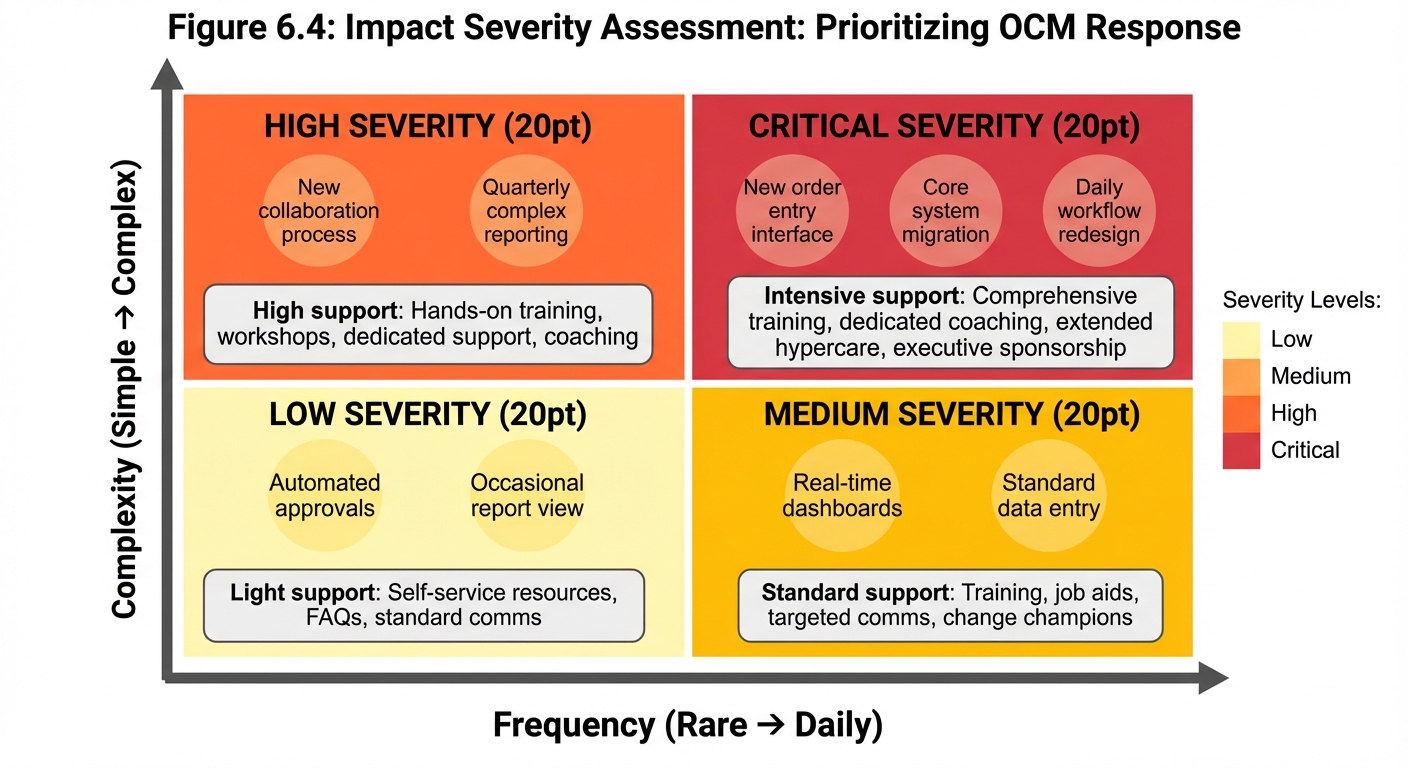
Figure 6.4: The Impact Severity Matrix plots impacts based on complexity and frequency to determine OCM response intensity. Critical impacts (complex and frequent) require intensive support including comprehensive training, dedicated coaching, and extended hypercare. Low impacts (simple and rare) need only light support.
Step 7: Develop Mitigation Strategies
For each significant impact, identify mitigation strategies:
| Impact | Mitigation Strategy |
|---|---|
| Complex new system interface | Role-based training with hands-on practice; super-users in each department |
| Loss of manual control | Clear escalation paths; manager override capability; gradual automation rollout |
| New cross-functional collaboration | Team-building activities; shared goals and metrics; collaboration tools training |
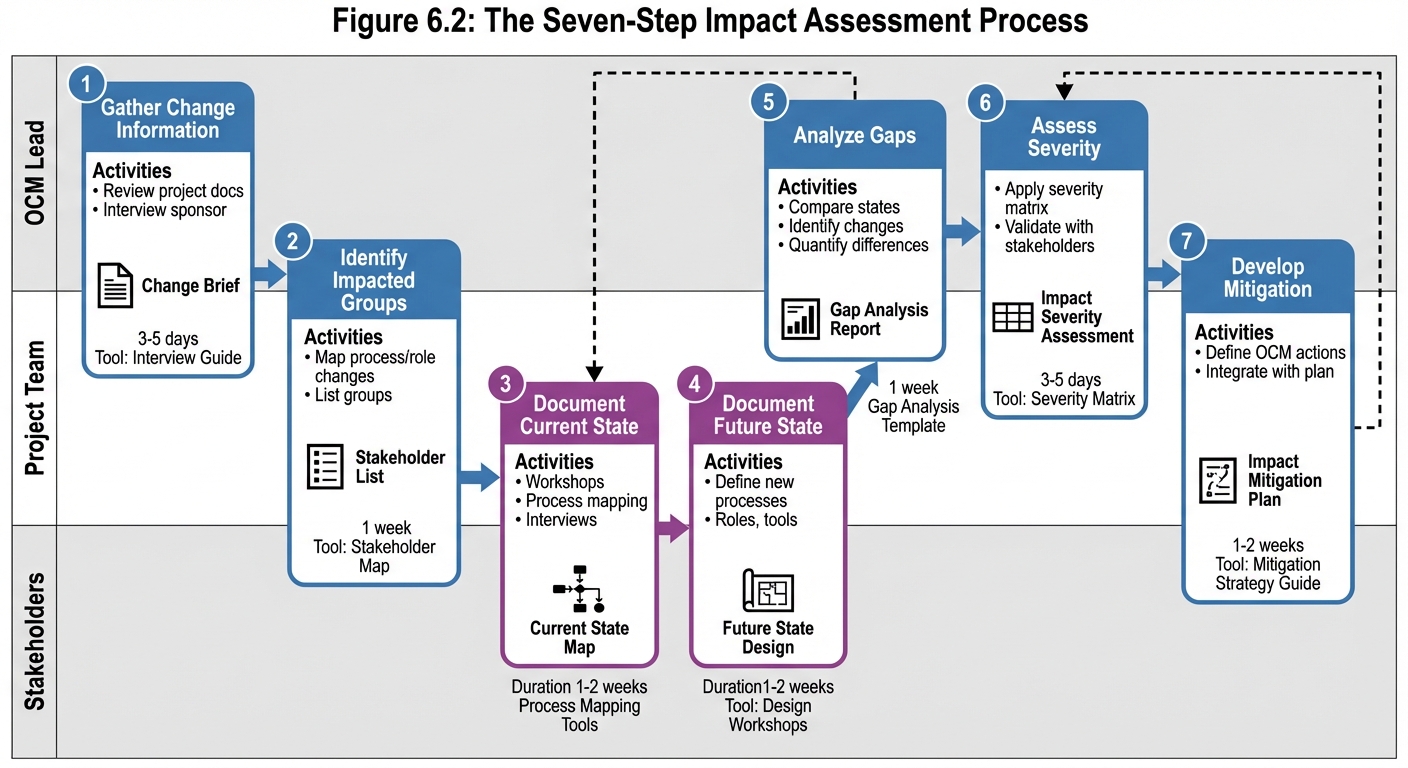
Figure 6.2: The impact assessment process follows seven steps from gathering change information through developing mitigation strategies. The process involves collaboration between OCM leads, project teams, and stakeholders, with feedback loops enabling iterative refinement.
Day in the Life Analysis
“Day in the Life” (DITL) analysis is a powerful technique for making impacts tangible and relatable. It describes how a typical workday will change for specific roles, making abstract impacts concrete.
Creating a DITL Analysis
Step 1: Select Representative Roles Choose roles that represent significant impacted populations. Focus on roles with high impact or high numbers.
Step 2: Document Current Day Describe a typical current workday hour by hour:
Current State: Customer Service Representative
- 8:00 - Log into System A, review overnight tickets
- 8:30 - Begin taking calls, use System A for order lookup
- 10:00 - Break
- 10:15 - Continue calls, manually transfer data between System A and B
- 12:00 - Lunch
- 1:00 - Afternoon calls, document issues in spreadsheet
- 3:00 - Send daily report to supervisor via email
- 5:00 - Log out
Step 3: Document Future Day Describe the same day after the change:
Future State: Customer Service Representative
- 8:00 - Log into unified portal, dashboard shows priorities
- 8:30 - Begin taking calls, single system for all lookups
- 10:00 - Break
- 10:15 - Continue calls, system auto-populates between modules
- 12:00 - Lunch
- 1:00 - Afternoon calls, issues auto-logged in system
- 3:00 - Supervisor accesses real-time dashboard (no report needed)
- 5:00 - Log out
Step 4: Highlight Key Changes Call out the significant differences:
- Single system vs. multiple systems
- Automated data transfer vs. manual entry
- Real-time reporting vs. daily email
- Dashboard prioritization vs. manual review
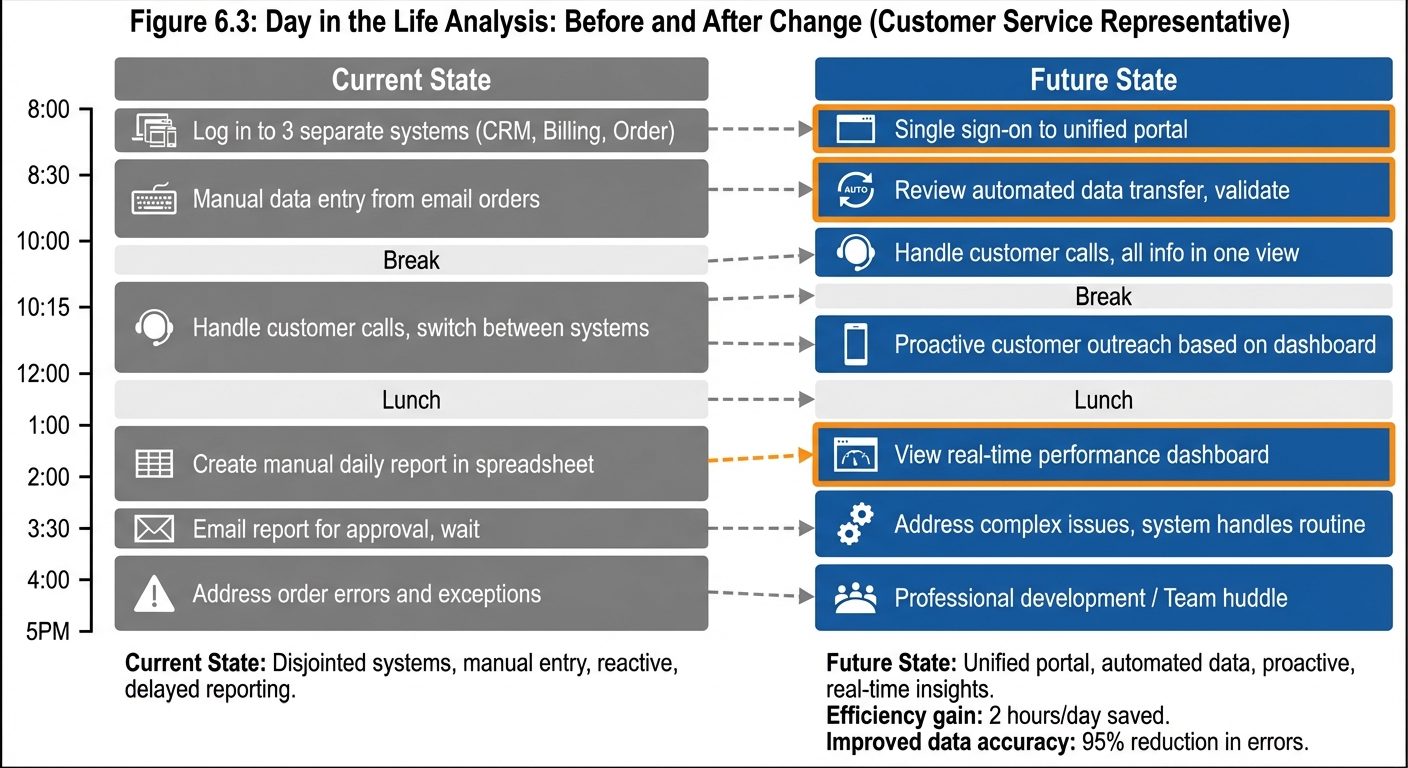
Figure 6.3: Day in the Life analysis shows how a typical workday changes for specific roles. This example for a Customer Service Representative highlights the shift from multiple systems to a unified portal, automated data transfer replacing manual entry, and real-time dashboards replacing email reports.
Using DITL Analysis
DITL analysis serves multiple purposes:
Communication: Helps stakeholders understand what will actually change in relatable terms
Training Design: Informs training content by showing what people need to learn
Impact Validation: Validates impact assessment findings with actual users
Adoption Support: Provides reference for what “good” looks like post-change
Impact Documentation
Impact Assessment Report
Document findings in a structured impact assessment report:
Executive Summary
- Overview of change and scope
- Summary of key impacts
- Recommended OCM response level
Methodology
- How assessment was conducted
- Sources of information
- Stakeholders consulted
Impact by Group For each impacted stakeholder group:
- Group description and size
- Process impacts
- Role impacts
- Skill impacts
- Technology impacts
- Cultural impacts
- Severity assessment
- Mitigation strategies
Consolidated View
- Impact heatmap across groups and dimensions
- Highest-severity impacts requiring attention
- Cross-cutting themes and patterns
Recommendations
- Recommended OCM approach and intensity
- Priority areas for intervention
- Resource requirements
- Risk areas requiring monitoring
Impact Register
Maintain an impact register for ongoing tracking:
| ID | Impact Description | Stakeholder Group | Dimension | Severity | Mitigation | Owner | Status |
|---|---|---|---|---|---|---|---|
| I-001 | New order entry interface | CSRs | Technology | High | Role-based training | Training Lead | Planned |
| I-002 | Automated approval under $500 | Managers | Process | Low | Communication | OCM Lead | Complete |
| I-003 | Real-time performance visibility | All staff | Cultural | Medium | Change messaging | Sponsor | In Progress |
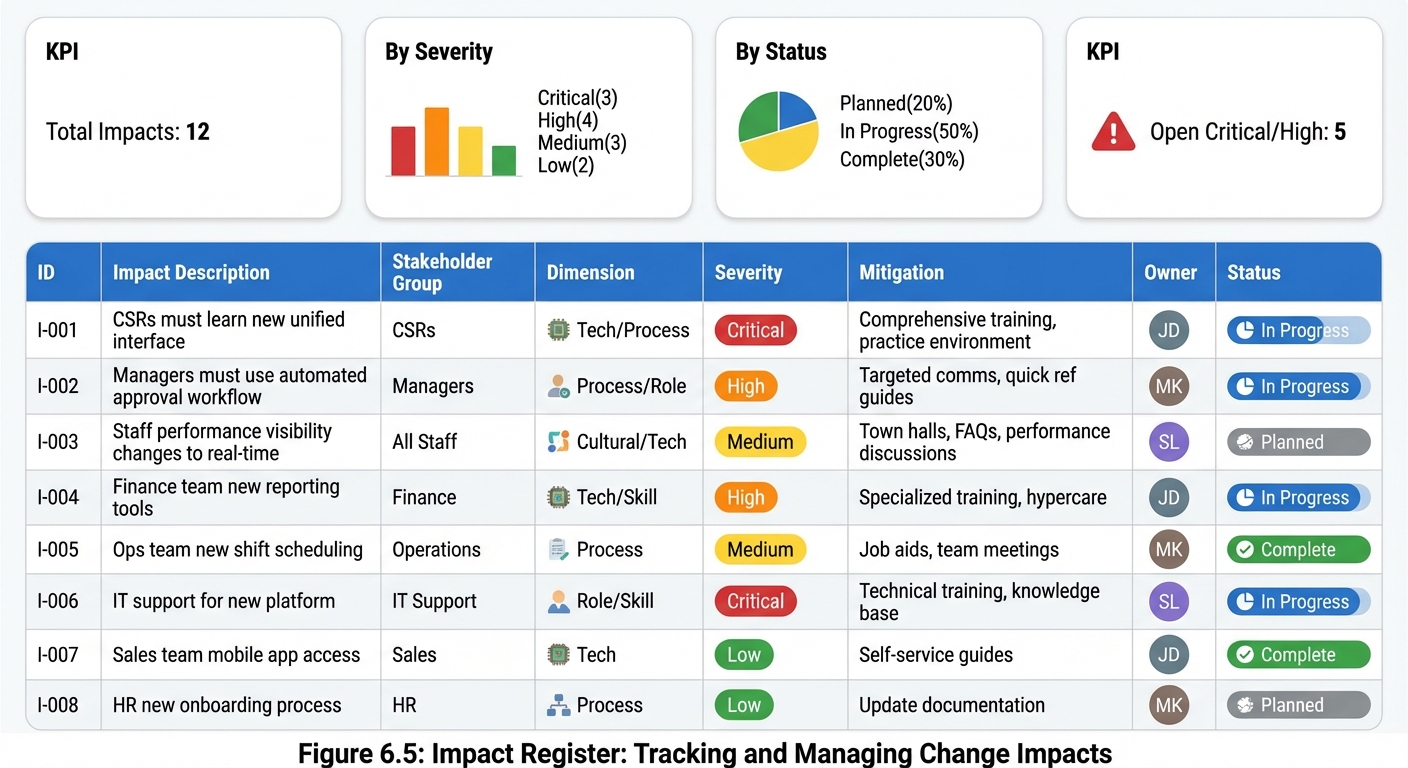
Figure 6.5: The Impact Register tracks all identified impacts, their mitigation strategies, owners, and status. Use this living document to manage impacts throughout the change lifecycle. Summary metrics show distribution by severity and current status for quick oversight.
Key Takeaways
- Impact assessment identifies specifically what will change and for whom, enabling targeted OCM responses
- Multiple dimensions must be evaluated: process, role, skill, technology, and cultural impacts
- Severity assessment prioritizes OCM investment toward highest-impact areas
- Day in the Life analysis makes impacts tangible and relatable for stakeholders
- Mitigation strategies address impacts proactively before they become problems
- Impact documentation provides foundation for training, communication, and support planning
Summary
Change Impact Assessment is the bridge between understanding what a change involves technically and understanding what it means for the people who must adopt it. By systematically analyzing impacts across multiple dimensions—process, role, skill, technology, and culture—OCM practitioners can develop targeted strategies that address actual needs rather than generic assumptions.
The specificity of impact assessment directly determines the effectiveness of OCM activities. Generic assessments lead to generic interventions that miss the mark. Detailed assessments enable training that addresses real skill gaps, communication that answers actual concerns, and support that’s positioned where it’s actually needed.
Investment in thorough impact assessment pays dividends throughout the change lifecycle in the form of better-prepared stakeholders, more effective interventions, and higher adoption rates.